Barcode Generator Free Online, No Signup
Type a product number or any text, pick the symbology, and watch the barcode update as you type. Code 128, EAN-13, UPC-A and EAN-8, with the check digit computed for you, downloadable as PNG or crisp vector SVG.
Generate your barcode
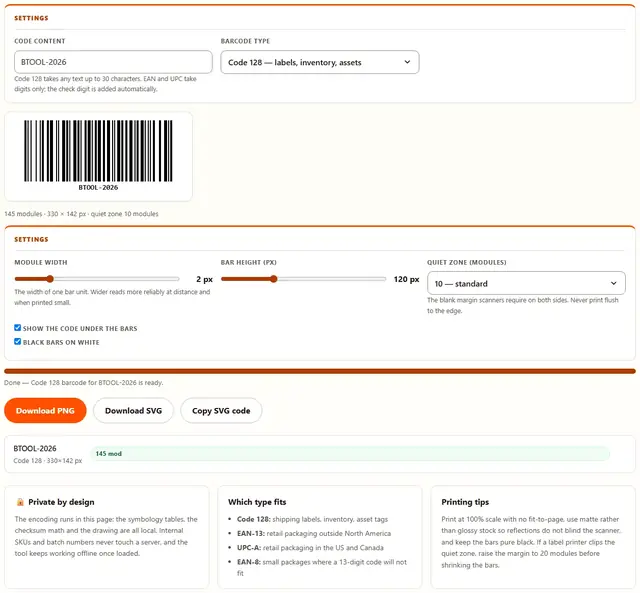
Code 128 takes any text up to 30 characters. EAN and UPC take digits only; the check digit is added automatically.
The width of one bar unit. Wider reads more reliably at distance and when printed small.
The blank margin scanners require on both sides. Never print flush to the edge.
Barcode Generator — illustrated, step by step
How to generate a barcode
Three steps, no accounts, no watermarks on the output.
Pick the type and type the code
Choose Code 128 for your own labels or EAN-13, UPC-A or EAN-8 for retail numbers. The check digit is computed for you as you type.
Tune the size
Module width and bar height control how the barcode prints and scans. The quiet zone keeps the blank margin scanners need.
Download
Save a PNG for documents and listings or an SVG for printing at any size. The copy button gives you the SVG source for design tools.
Why generate barcodes in the browser?
Because the codes you generate are often internal: warehouse SKUs, asset numbers, event tickets. Encoding them locally means the value never leaves the tab, there is no account and no queue, and the file is ready the moment you stop typing. Details are in our file-handling policy.
Troubleshooting
Are my codes sent anywhere when I generate a barcode?
No. The barcode is encoded by this page: the symbology math runs in JavaScript, the bars are drawn on a canvas or written as SVG rectangles, and the file is downloaded straight from the tab. There is no server round trip, so batch numbers and internal codes stay on your device.
Which barcode type should I pick?
Code 128 for anything you control: shipping labels, inventory, asset tags, wristbands. It encodes all 128 ASCII characters in a compact bar pattern and is what most modern scanners default to. EAN-13 is the retail product code printed on packaging in Europe and most of the world, UPC-A is its North American 12-digit sibling, and EAN-8 is the short retail code for small packages.
Will scanners actually read these?
Yes, when the geometry is respected. The generator draws the exact module proportions each symbology specifies and always keeps the quiet zone: the blank margin scanners need on both sides. Print or display at a reasonable size, keep the bars black on a light background, and avoid scaling the PNG non-uniformly, which distorts the module widths.
PNG or SVG?
PNG when you are placing the code in an email, a document or a listing, at the pixel size you need. SVG when the code will be printed or scaled, because vector bars stay perfectly crisp at any size, and print shops prefer it. Both downloads contain the same bars, so a scanner reads either identically.
How big should a printed barcode be?
For Code 128, a module width of 0.5 mm works at typical checkout distance and 0.25 mm is the practical floor for hand scanners. The bar height matters less than the width but should stay above 15% of the total width so the scanner can find the bars quickly. The default settings here produce a code that prints well on a standard label.
My number is rejected under EAN-13
EAN-13 accepts exactly 12 digits and computes the 13th check digit automatically; UPC-A accepts 11 and computes the 12th. If you have a full 13-digit code that fails validation, it likely already contains a check digit that does not match: drop the last digit and let the tool recalculate it, or check that the number is truly an EAN rather than an internal SKU, which belongs in Code 128.
Barcodes that scan on the first try
Scanners read barcodes by measuring the relative widths of bars and spaces, so the geometry has to survive whatever happens to the label between printing and scanning. That is why the module width is the most important control here: it sets the width of the smallest element, and every bar in the code is an exact multiple of it. Print at a module width of half a millimetre or more and the code tolerates small print errors, cheap label stock and the scanner being held at an angle.
The quiet zone is the other half of reliability. Every symbology specifies a blank margin, measured in modules, that tells the scanner where the code starts and ends; a code printed flush against a box edge or a dark background reads as noise to the decoding logic. The default of 10 modules covers retail and shipping scanners comfortably, and raising it to 20 costs almost nothing in label space while adding margin against clipping.
| Symbology | Input | Typical use |
|---|---|---|
| Code 128 | Any text, up to 30 chars | Labels, inventory, assets |
| EAN-13 | 12 digits, check digit added | Retail packaging worldwide |
| UPC-A | 11 digits, check digit added | Retail in US and Canada |
| EAN-8 | 7 digits, check digit added | Small retail packages |
Barcodes and QR codes
Barcodes encode a short identifier that a laser scanner reads in a line, which is why they stay on packages and labels: they are cheap to print, fast to read at a checkout, and need only ink and contrast. QR codes encode much more data in a square that any phone camera can read, which is why they suit URLs, Wi-Fi credentials and menus.
Both live on this site: use this tool for scannable retail and inventory codes, and the QR Code Generator when the destination is a link or a chunk of text that a person will scan with a phone. Each renders locally, and both offer a vector download for print work.
Need a QR code instead?
The QR Code Generator makes scannable codes for links, Wi-Fi and text: same privacy, same speed.
Open QR Code Generator