JWT Decoder: Read & Verify Any Web Token
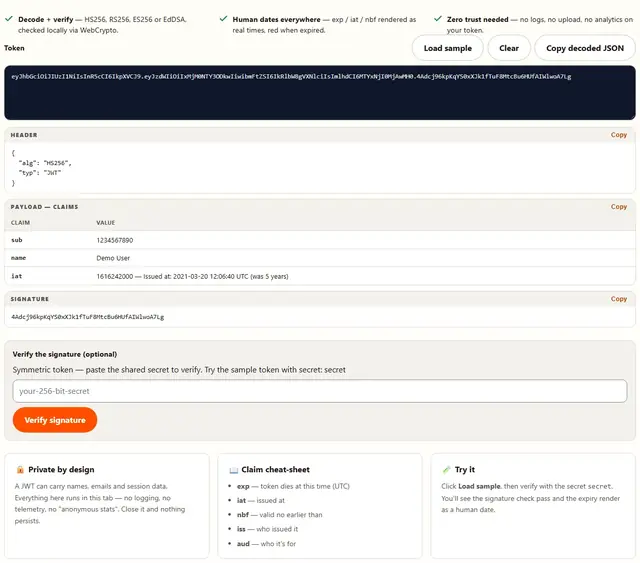
Paste a JSON Web Token and see its three parts — header, payload, signature — with human-readable dates, claim-by-claim breakdown, and live verification with your own secret or public key. The token never leaves your browser.
- Decode + verify — HS256, RS256, ES256 or EdDSA, checked locally via WebCrypto.
- Human dates everywhere — exp / iat / nbf rendered as real times, red when expired.
- Zero trust needed — no logs, no upload, no analytics on your token.
| Claim | Value |
|---|
Paste the shared secret (HS256) or PEM public key (RS256/ES256/EdDSA). Verified locally; nothing is sent anywhere.
JWT Decoder — illustrated, step by step
How to decode a JWT
Three moves. No install, no signup, nothing to send.
Paste the token
Copy the token from your cookie, console or curl output. It splits into header, payload and signature as you type.
Read the claims
Dates like exp render as real times, red when expired. iss and aud tell you who it's for. alg=none gets flagged instantly.
Verify if you hold a key
Paste your shared secret (HS256) or PEM public key (RS256/ES256/EdDSA) — the signature is checked right here, never on a server.
Anatomy of the three segments
Every JSON Web Token is three base64url strings joined by dots: header.payload.signature. The header declares the algorithm — {"alg":"HS256","typ":"JWT"} — the payload carries the claims (sub, exp, iat, iss, aud, plus whatever custom fields your issuer bolted on), and the signature is a cryptographic seal over base64url(header) + "." + base64url(payload). Base64url differs from plain base64 in two ways: it swaps + and / for - and _, and it strips the = padding — a strict base64 decoder rejects many tokens outright.
The line we draw here: decoding is not verifying. Anyone can flip a claim in the payload, re-encode it, and hand you a perfectly readable forgery. Only the signature check — your shared secret for HS256, or the issuer's PEM key for RS256/ES256/EdDSA — tells you the token is intact. Verification runs locally via WebCrypto; your key never leaves this tab.
- HS256 is symmetric — one secret signs and verifies; every verifying party holds the signing key.
- RS256 is asymmetric — the issuer signs privately; you verify with the public PEM.
kidnames which key. - alg=none means unsigned. We flag it red on sight; your backend must reject it too, not just this page.
- A valid signature ≠ an authorized request.
exp,nbfand audience checks still apply after verification. - Never paste live production tokens into sites you don't fully trust — decoding is read-only, but a token is a bearer credential.
Honest limits: we can't fetch the issuer's JWKS, check revocation lists or confirm your server actually enforces exp — that is your backend's job. What we can give you instantly is which algorithm signed it, what the claims say, and whether the signature matches the key you hold.
JWT FAQ
Is a JWT encrypted?
No. A standard JWT (JWS) is signed and base64url-encoded, not encrypted. Anyone holding it can read the header and payload — the signature only proves issuer and integrity. Never put secrets in a payload.
How do I verify a JWT signature?
Paste your key above. HS256: shared secret. RS256: RSA public key (PEM). ES256: P-256 public key. EdDSA: Ed25519 public key. Private keys are never needed here.
What do exp, nbf, iat mean?
exp = expiry, nbf = not valid before, iat = issued at. Unix seconds, UTC. This page shows them as human dates and relative times — red means the token has already expired.
What is alg=none and why is it dangerous?
A token with no signature. Anyone can edit it and it still "verifies". Production must reject alg=none; this page flags it in red on sight.
Where should I store a JWT in my app?
httpOnly, Secure, SameSite cookies are the safe default — JavaScript can't read them. localStorage is reachable by any XSS injection; use it knowingly.