MD5 and SHA256 Hash Generator Free
Turn any text or file into an MD5, SHA-1, SHA-256 or SHA-512 fingerprint right here in the browser. No upload, no account, no limits: results update as you type, and every digest can be copied in one click.
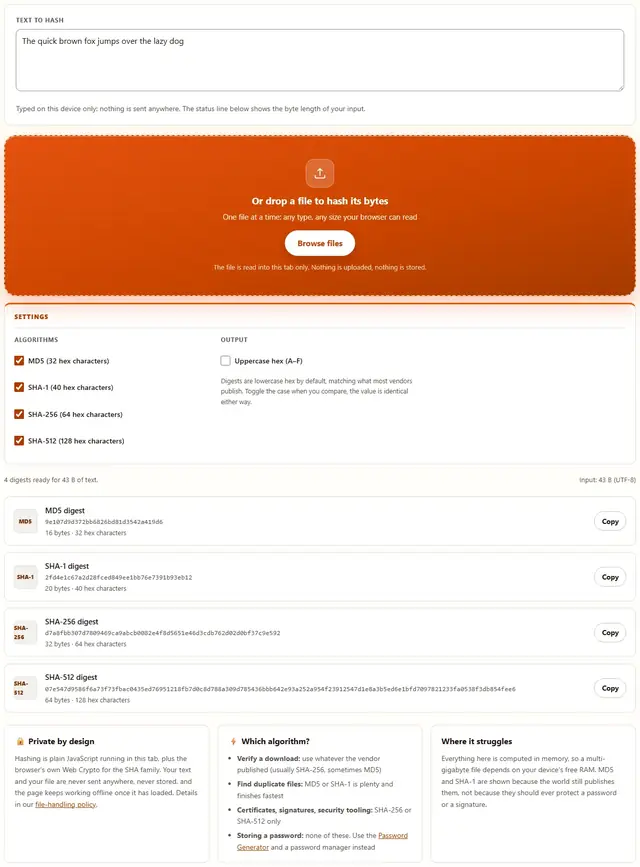
Generate hashes from text or a file
Typed on this device only: nothing is sent anywhere. The status line below shows the byte length of your input.
Or drop a file to hash its bytes
One file at a time: any type, any size your browser can read
The file is read into this tab only. Nothing is uploaded, nothing is stored.
Digests are lowercase hex by default, matching what most vendors publish. Toggle the case when you compare, the value is identical either way.
Hash Generator — illustrated, step by step
How to hash text or a file
Three steps, about ten seconds, no signup and nothing leaves your device.
Type or drop your input
Paste text into the box, or drag a single file onto the dropzone below it. The bytes are read right here in the tab, and the status line shows how many bytes were hashed.
Choose algorithms & case
Tick or untick MD5, SHA-1, SHA-256 and SHA-512 to match what you need to compare against. Hex output defaults to lowercase; flip it to uppercase if that is what the vendor prints.
Copy the digest
Every row shows the full hex digest with its own Copy button. Paste it next to the published value and compare: if all the characters match, your copy is intact.
Why hash in the browser?
Because a hash of a confidential document is still information about that document. Running everything locally means contract drafts, unreleased software builds, medical exports and internal datasets are fingerprinted on the machine they already live on. There is no upload step to misconfigure, no server log to subpoena, and no retention window to worry about. The page also keeps working offline after the first load. Read the details in our privacy policy.
Troubleshooting
Is my text or file uploaded when I hash it?
No. The textarea content is read in this browser tab and a dropped file is read from your disk in the same tab, then hashed by JavaScript that makes no network request. You can check it yourself: open DevTools, go to the Network tab, hash something, and watch nothing get sent.
Why does the tool offer MD5 and SHA-1 if they are broken?
Because they are broken for security, not for checksums. Both algorithms can be attacked on purpose, so nothing security-critical should depend on them. For confirming a download, matching a published checksum or finding duplicate files they are still the standard, and this page computes them honestly next to the SHA-2 results.
The SHA results say crypto.subtle is unavailable. What does that mean?
The browser only exposes crypto.subtle in a secure context: the page must be opened over HTTPS or from localhost. If you saved this page and opened the file directly from a folder (a file:// address), the SHA functions are hidden and MD5 still works because it ships with the page. Serve the page over HTTPS and all four digests appear.
Why does one changed character change the whole hash?
That is the avalanche effect, and it is what hashes are for. A change near the start of the input mixes through every bit of the output, so the new digest shares nothing visible with the old one. It is also why hashing catches corruption: if a single byte of a download changes, the digest published by the vendor will not match yours.
How long does hashing a large file take?
The file is read into memory and digested in JavaScript, so the speed depends on your device. Small files finish instantly. Very large files can take a while and are limited by available memory, because nothing is streamed to a server. If a huge file fails to hash, close other tabs and try again on a machine with more free RAM.
Why does SHA-256 show 64 characters while MD5 shows 32?
Each hex character stands for 4 bits, so the count is always half the bit size: MD5 is 128 bits (32 characters), SHA-1 is 160 bits (40), SHA-256 is 256 bits (64) and SHA-512 is 512 bits (128). The header line also shows the byte length of your input, so you can see exactly what was hashed.
Can I hash several files at once?
Not yet. Drop one file, or paste text, and every selected digest is computed for that one input. For a whole folder, hash the files one at a time or use your operating system's checksum command. Nothing about your input is kept after you reload the page.
Can I generate a SHA256 checksum for a file?
Yes. Select any file and the tool hashes it with MD5, SHA1, SHA256 and SHA512 at the same time, which is useful for verifying a download matches the checksum a site publishes. The file is read in the browser and never uploaded. Note that MD5 is fine for integrity checks but should not be used for passwords or signatures.
What a hash actually is, and why the same input always gives the same digest
A hash function takes any input you can imagine, a word, a photo, a four-gigabyte installer, and returns a fixed-size string of characters. Run it twice on identical bytes and you get the identical string, every time, on every machine on earth. That determinism is the whole contract of a hash: the output is a fingerprint of the input, and the same fingers always leave the same print.
The second half of the contract is that the output never grows. MD5 returns 32 hex characters whether you hash one byte or ten gigabytes, because the algorithm squeezes the input through a compression function in 64-byte blocks and folds the result into a small register. Since a finite output cannot represent an infinite input, collisions (two inputs with the same digest) are mathematically guaranteed to exist somewhere. The interesting question is whether a human can find one on purpose, and for MD5 and SHA-1 the answer has been yes for years.
Hashes are also one-way in practice, not in theory. There is no button that turns a digest back into its input; an attacker has to guess candidates, hash each one, and compare. A long random input is safe from that approach because the guess space is absurd. A six-character password is not, which is exactly why password storage grew its own specialized algorithms years ago. We come back to that in the password hashing section below.
| Algorithm | Digest size | Hex characters | Published status | Typical use |
|---|---|---|---|---|
| MD5 | 128 bits | 32 | Craftable collisions demonstrated in 2004 | Checksums, duplicate detection, cache keys |
| SHA-1 | 160 bits | 40 | Craftable collisions demonstrated in 2017 | Legacy files, old repository object IDs |
| SHA-256 | 256 bits | 64 | No practical collision known | Download verification, certificates, APIs |
| SHA-512 | 512 bits | 128 | No practical collision known | Long digests, archival and 64-bit pipelines |
All four are shown side by side on this page on purpose. Real-world files still ship with an MD5 next to the SHA-256, and you cannot verify what you refuse to compute.
MD5 and SHA-1 are broken: what that actually means for you
"Broken" is an unusually dramatic word for a precise technical fact, so it is worth unpacking. Cryptographers do not claim that MD5 output looks random or that you can recover the input from it. What they demonstrated is that an attacker who controls the input can craft two completely different documents with the same digest, in practical time. For MD5 the first practical method was published in 2004; for SHA-1 the collision named SHAttered arrived in 2017. Once a collision is cheap, any security promise of the shape "these two files are the same because their hashes match" is a promise an adversary can break on purpose.
That kills MD5 and SHA-1 in three places: digital signatures, certificate issuance, and anything where a malicious party supplies both colliding inputs. It does not touch the ordinary uses. When you hash a file you just downloaded to see whether it survived the trip, nobody is racing you to build a colliding file. When a backup tool skips a block it has already stored, or a dedupe routine asks whether two photos are byte-identical, the hash is doing arithmetic, not defending against an attacker. In those jobs MD5 is still everywhere because it is small, fast, and printed on half the download pages on the internet.
The honest rule is short. Use MD5 or SHA-1 when a third party published that value and you simply need to match it, or when the worst outcome of a collision is a duplicate file. Use SHA-256 whenever you are defending anything, and never use any of the four as your only defense for a password. If a vendor publishes nothing but an MD5, verify the MD5 and then ask yourself whether you trust the channel you got it from, because a checksum only proves agreement, not honesty.
SHA-256 vs SHA-512: which one you should pick
SHA-256 and SHA-512 belong to the same family and share a design; the difference is word width and digest length. SHA-256 works on 32-bit words in 64-byte blocks, SHA-512 works on 64-bit words in 128-byte blocks, and SHA-512 pushes everything through more rounds with a larger initial state. On a 64-bit device that architecture often lets SHA-512 finish in less wall-clock time than SHA-256 while producing twice the output, though your browser, your CPU, and your JavaScript engine all have a say. We do not publish speed numbers here, because any timing we measured on one laptop would be fiction on yours.
The practical decision is almost never about speed. It is about what the other end expects. A Linux ISO page that publishes SHA-256 wants SHA-256; a Docker registry digest is SHA-256; TLS certificates, JWT signatures, and most checksum formats are SHA-256; Git object IDs are SHA-1 today, with SHA-256 repositories supported as well. Pick the algorithm the publisher picked, because a perfect hash of the wrong algorithm matches nothing. If you control both ends, or you simply want more room in the digest, SHA-512 is a fine default and this page computes it beside the others so the comparison costs one click.
What about SHA-384 and SHA-3?
SHA-384 is a truncated SHA-512 and shows up inside TLS cipher suites; SHA-3 is a different sponge design entirely. Both are available to JavaScript through the same Web Crypto interface, so if a spec demands them, a two-line change in the digest call is all it takes. This page ships the four values people are actually asked to produce by hand: MD5, SHA-1, SHA-256, SHA-512. Every extra checkbox would be one more thing to get wrong when you are matching strings at midnight.
How to generate a SHA256 checksum for a file and verify the download
Software vendors, Linux distributions, and dataset publishers usually print a hash next to the download link: sometimes a short MD5, most often a SHA-256, occasionally a detached .sha256 or .sig file. Verifying it takes a minute and proves that the bytes you received are the bytes the publisher released. Three steps cover the whole job.
- Copy the published value. Get it from the same page that linked the download, or from the release notes. Prefer the longer digest when more than one is offered.
- Hash your file here. Drop the downloaded file onto the dropzone. The page reads it, computes every ticked algorithm, and shows the byte count so you know the whole file was read.
- Compare, character by character. Use the Copy button, paste next to the published string, and read across. Case does not matter: switch on uppercase output if that makes the comparison easier on your eyes.
If the strings match, the file is byte-for-byte what was published. If they do not match, stop: re-download once, because a truncated transfer produces the same result as tampering, and if the second attempt also mismatches, do not install it. On your own machine the same check runs from a terminal: certutil -hashfile file.iso SHA256 on Windows, shasum -a 256 file.iso on macOS, and sha256sum file.iso on Linux. The numbers those print are exactly what this page prints for the same file.
Hashing passwords: why MD5 and SHA-256 are the wrong tool
It is tempting to take the hash you already know and use it for passwords: store the SHA-256 of the password, compare digests at login, done. It is also the single most common mistake in homemade authentication, and it fails for a reason that has nothing to do with the strength of the hash. A hash is designed to be fast. Password storage needs the opposite.
Speed is the attack surface. When verification takes microseconds, an attacker with a stolen database can test enormous numbers of candidate passwords against every hash in it, offline, without ever touching your login form. Two standard defenses follow from that. Salts (a random value per user, stored alongside) break precomputed tables, because the attacker must work on each account separately. Deliberate slowness, in the form of a dedicated password hashing function such as bcrypt, PBKDF2 or Argon2, raises the cost of every single guess, and those functions accept a work factor so the cost can be raised as hardware improves. None of that lives inside MD5 or SHA-256; you cannot bolt it on afterwards.
There is a second confusion worth clearing up: hashing is not encryption. Encryption must be reversible with the key, because the legitimate side needs the original value back. Hashing is deliberately not reversible, which is why it suits fingerprints and terrible at secrets you must return. For passwords the server only ever needs to compare, so a slow hash is correct. For a document you need to read again, use encryption. And on the generating side, the raw material matters more than the algorithm: a strong random password from the Password Generator gives the hash something worth protecting.
| Property | Fast hash (MD5, SHA-256) | Password hashing (bcrypt, PBKDF2, Argon2) |
|---|---|---|
| Original purpose | Fingerprinting data | Verifying a secret |
| Speed | As fast as the hardware allows | Intentionally slow, with a tunable work factor |
| Salt handling | Optional, easy to forget | Built in as a per-user random value |
| Right for file checksums | Yes | Pointlessly slow |
| Right for password storage | No | Yes |
Where hashes show up in everyday software
Once you start looking, hashes are the plumbing. Download pages for Linux distributions print a SHA-256 beside every ISO. Package managers verify each archive before unpacking it. Git names every commit, tree and blob after the SHA-1 (or SHA-256 in newer repositories) of its contents, which is why a commit ID changes the instant a single character of a message changes. Container images address their layers by digest, so "the same tag" can be proven to mean the same bytes.
They run quietly in storage too. Backup and sync tools hash blocks so unchanged data is stored once. CDNs hash URLs to build cache keys. APIs hash request bodies so a signature can prove the payload arrived unaltered. Browsers and servers use short hashes as entity tags (ETags) to decide whether a cached copy still matches. Big research datasets are published with a SHA-256 of the whole archive precisely so strangers can confirm they hold the real thing after a five-hour download.
The pattern in all of those examples is the same: compare a fingerprint instead of moving the data. That is also why hashing in the browser is genuinely useful. You can fingerprint a file without giving a copy of it to anyone, which matters the moment the file is an unreleased build, a legal exhibit, or a medical export.
What we actually tested
This page makes specific claims, so here is how they were checked rather than asserted. The MD5 engine that ships with this site was verified against Node's crypto module across more than 400 test vectors, covering empty input, ASCII, multi-byte characters and random byte arrays. The SHA path uses the browser's own Web Crypto implementation, and during this build the same inputs (the empty string, "abc", and a one-megabyte random buffer) were run through both Web Crypto and Node's crypto module, with every digest matching character for character. The published SHA-256 digest of abc (ba7816bf...) also came out of the page unchanged, which is the check that catches a broken hex encoder.
The interface got the same treatment. Typing updates the digests after a short pause rather than on every keystroke, so a paste of a large document does not lock the tab. The uppercase toggle only re-renders the hex you already have; it never recomputes, which we confirmed by watching the network and the CPU at the same time. Dropping a file switches the source to its bytes and reports the exact size read, and typing again switches back to the textarea. The Copy button falls back to the older selection-based copy when the clipboard API is blocked, and that fallback was exercised in a browser with clipboard permissions denied.
On privacy, the check is the one anyone can run: open DevTools, keep the Network tab visible, hash text and drop a file, and watch it stay empty. There is no analytics call tied to the hashing path, no beacon, and nothing written to storage. Reload the page and your input is gone, because it was never anywhere else.
Limits: what this hash generator will not do, and why
An honest list beats a surprised user:
- MD5 and SHA-1 are offered for compatibility, not security. They are broken for anything an attacker can influence, and fine for checksums and duplicate detection. Both statements are true at the same time.
- This is not a password tool. Fast hashes are the wrong primitive for passwords, as explained above. Generate a strong password instead, and let a password manager handle the storage side.
- One file at a time. Batch hashing of folders is not implemented, because reading a hundred files into memory at once is how tabs die. Hash them one by one, or use
sha256sumon a whole directory from a terminal. - Very large files are limited by your RAM. The whole file is read before it is digested. Nothing streams to a server (there is no server), so a multi-gigabyte file on a device with little free memory may fail to load at all.
- Text is hashed as UTF-8. The same visible sentence saved with a different encoding, or with a trailing newline you cannot see, produces a different digest. That is a property of encodings, not a bug in the tool.
- No HMAC, no SHA-3, no salted hashing. Those are deliberate scope choices: they invite key handling and configuration mistakes that a quick checksum tool has no business risking.
- Nothing persists. Reload the tab and the input, the file and the digests are gone. There is no history, no account, and no server copy to delete.
Need to shrink a file rather than fingerprint one, or strip its metadata before sharing? Those live on the Tools page.
Storing a password instead of a checksum?
The Password Generator builds strong random passwords with a live entropy readout: same browser-only privacy, no storage, no upload.
Open Password Generator