HEIC to JPG: Convert iPhone Photos Instantly
Drop your iPhone's .HEIC photos and get JPG or PNG files that open everywhere — on Windows, in WhatsApp, in government upload forms. Batch up to 50 files at once, and nothing ever leaves your device.
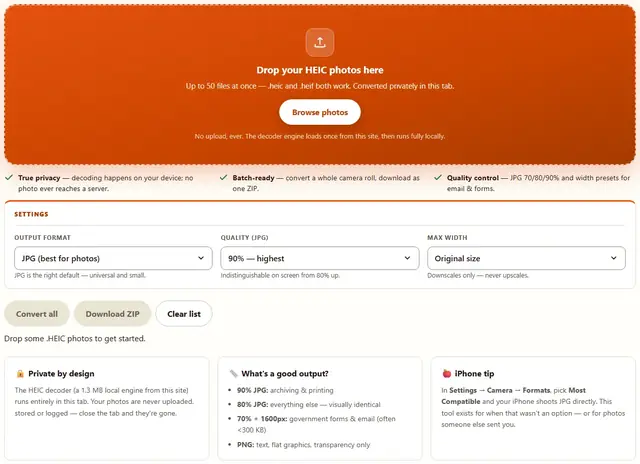
Drop your HEIC photos here
Up to 50 files at once — .heic and .heif both work. Converted privately in this tab.
No upload, ever. The decoder engine loads once from this site, then runs fully locally.
- True privacy — decoding happens on your device; no photo ever reaches a server.
- Batch-ready — convert a whole camera roll, download as one ZIP.
- Quality control — JPG 70/80/90% and width presets for email & forms.
JPG is the right default — universal and small.
Indistinguishable on screen from 80% up.
Downscales only — never upscales.
Drop some .HEIC photos to get started.
HEIC To JPG — illustrated, step by step
How to convert HEIC to JPG
Three steps. No account, no upload, nothing to install.
Drop the photos
Drag a batch from your camera roll onto the zone — .heic and .heif both work, and each file shows its size before you convert.
Choose format and quality
JPG at 90% keeps everything. 80% is the sweet spot. 1600px wide clears almost every upload form on earth.
Download
One file pops straight down; a batch comes as a single ZIP. Re-run freely — it's your device, your files.
What HEIC actually is — and what conversion costs
HEIC is Apple's branding of the HEIF container carrying HEVC (H.265) — usually Main Still Picture coding, often 10-bit on newer iPhones. It exists because H.265 encodes a 12 MP photo roughly half the size of JPEG at equal quality. That is also why browser support lags: HEVC is royalty-bearing, so Chrome and Firefox on desktop will not decode .heic natively and Safari remains the exception. This page decodes locally in a bundled libheif engine — nothing uploads, and once the 1.3 MB engine loads, conversion works fully offline.
Honesty about the trade: HEIC→JPEG is a lossy→lossy transcode. The decode is mathematically exact, but re-encoding at 80% discards information the original HEIC already spent to save space — you stack compression on compression. 90% is visually identical for photos; 70% is for upload caps only. The re-encode also strips all metadata: no GPS (good), no capture date (sometimes bad), and 10-bit HDR is flattened to 8-bit SDR.
- EXIF rotation — orientation is generally honored on decode, so sideways camera shots come out upright; spot-check the batch before an upload form accepts it.
- Format choice — JPG for photos; PNG only for flat graphics or transparency needs.
- Batch behavior — up to 50 files, converted sequentially on your CPU; it is your machine's work, not a server's.
- When to skip this tool — need location metadata, ICC fidelity or HDR originals? Export via Settings → Camera → Formats → Most Compatible, or Photos/Preview; that's the lossless path this re-encode can never be.
- Honest limit — Live Photos arrive here as their still frame only; the motion component is not converted.
HEIC to JPG FAQ
Why can't my Windows PC open .HEIC files?
HEIC is Apple's default since iOS 11. Windows and most non-Apple apps either need a paid codec or refuse the file. Converting to JPG once makes the photo readable everywhere, forever.
Does quality survive the conversion?
Yes. HEIC is already lossy, so this is a re-wrap at 80–90% quality — you won't see a difference on screen or in prints up to A4. Use 70% only when a form caps your file size.
Can I convert many files at once?
Yes — up to 50 per batch. Click Convert all, then download the ZIP, or the files one at a time. Each file converts sequentially on your device.
Does it work offline?
After the one-time local engine loads (1.3 MB, from this site — not a third party), conversion works with no network at all. Your photos never leave this tab.
JPG or PNG?
JPG for photos — smaller and universal. PNG only for flat graphics, text-heavy images or anything with transparency.
Related tools
Need to hit an exact upload size too? Image Compressor shrinks JPG/PNG to a target like 200KB or 100KB. Wrong format entirely? Image Converter handles WebP, PNG and JPEG both ways. And if the photo came from a scanner with hidden data: EXIF Remover strips the GPS and camera info.
Convert your HEIC photos now
Drop them in, pick JPG 80%, download the ZIP. Free forever.
HEIC to JPG