Compress BMP Online Free: Turn Heavy Bitmaps into Small JPEGs
Compress a BMP file by converting it to JPEG right in your browser: a 10 MB uncompressed bitmap typically lands under 500 KB. No upload, no signup, no watermark.
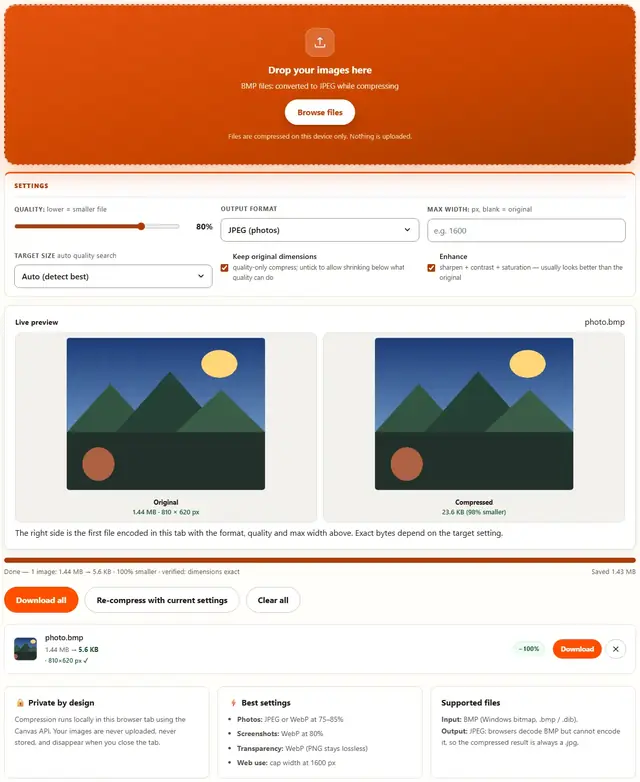
Compress your BMP files
Drop your images here
BMP files: converted to JPEG while compressing
Files are compressed on this device only. Nothing is uploaded.
The right side is the first file encoded in this tab with the format, quality and max width above. Exact bytes depend on the target setting.
Compress BMP — illustrated, step by step
How to compress a BMP
Three steps, about ten seconds, no technical skills needed.
Add your BMP files
Drag .bmp bitmaps onto the dropzone, or click to browse. Every file is converted, so batches work too.
Pick a JPEG quality
The output format is fixed to JPEG because browsers can encode JPEG (and WebP), not BMP. 75-85% quality is right for photos and scans.
Download smaller files
The row shows the original BMP size next to the new JPEG size: typically a 90-98% reduction. Download one file or all at once.
BMP files: where they come from and what to do with them
BMP is raw pixels with almost no compression attached. A 300 DPI A4 color scan can weigh 25 MB before a single eyeball sees it. It survives because it predates the web: universal, dead simple, and indifferent to quality settings.
You'll meet BMPs mostly from: ancient scanners, industrial and medical equipment exports, embedded camera firmware, legacy point-of-sale terminals, and that one Windows PC nobody retired. Also, very occasionally, a screenshot saved the dumb way.
Right moves, in order:
- Resize it first. BMP pays per pixel like nobody else. Halving dimensions is a 4× size cut before any format trickery.
- Need it lossless and portable? PNG — same pixels, dramatically smaller. Nothing is lost except bytes.
- Is it a photo? Convert to JPEG or WebP and accept lossy. Photos tolerate it; BMPs of photos are the worst of both worlds.
One honest exception: some medical and industrial viewers demand BMP bytes specifically. If the software says "BMP or nothing", keep the original file untouched and do your actual work on a PNG copy.
Security note, honestly stated: old BMP decoders had real, serious bugs for decades. Modern browsers and apps decode it safely, but "ancient tool that only reads BMP" is a phrase worth side-eyeing. When in doubt, view it here or in your browser — never in a 2004 program on an offline machine.
Your images never leave this device
Everything happens inside your browser tab. There is no upload step, no server processing and no file logging: the tool works even after you go offline. That makes it safe for confidential documents, client work and personal photos. Details in our file-handling policy.
BMP compression: FAQ
Why does this tool output JPEG instead of BMP?
BMP is an uncompressed format: browsers can decode it but cannot encode it. BeeToolify therefore converts each bitmap to JPEG while compressing, which is where the size actually comes from.
How much smaller will my BMP get?
A typical 24-bit BMP lands 90-98% smaller as JPEG at 80% quality: a 10 MB bitmap becomes roughly 300-600 KB, depending on detail.
Does BMP keep transparency?
Standard BMP files have no alpha channel, so nothing is lost in the JPEG conversion. If your file has transparency, it is actually a different format with a .bmp name: convert it to WebP or PNG with the Image Converter instead.
Are old Windows .bmp and .dib files supported?
Yes: both decode in every modern browser. Drop them in and the same JPEG conversion applies.
Why BMP files are huge, and how to fix it
BMP stores every pixel as raw bytes with no compression: a 1920x1080 24-bit bitmap is about 6 MB before you add anything. The format dates from an era when disk space was cheap and CPU cycles were not; modern life is the opposite, so any BMP travelling by email or sitting on a web page should be converted.
JPEG is the natural destination for photographic bitmaps: at 80% quality the visible difference is negligible while the byte count collapses. If the bitmap is a screenshot with sharp text or hard-edged graphics, convert to PNG or WebP with the Image Converter instead: JPEG's block-based encoding smears text edges that lossless formats keep crisp.
Learn more
Size limits, KB targets and form rejections: Compress a Photo to 20KB, 50KB or 100KB for Online Forms. Working the other way (bigger files, not smaller): Image Resizer.