Image to JPEG Free: Convert PNG & WebP to JPEG
Convert images to JPEG in this tab: no upload, no signup, no watermark. Drop PNG, WebP or other files and download .jpeg images that open on any device.
Convert your images to JPEG
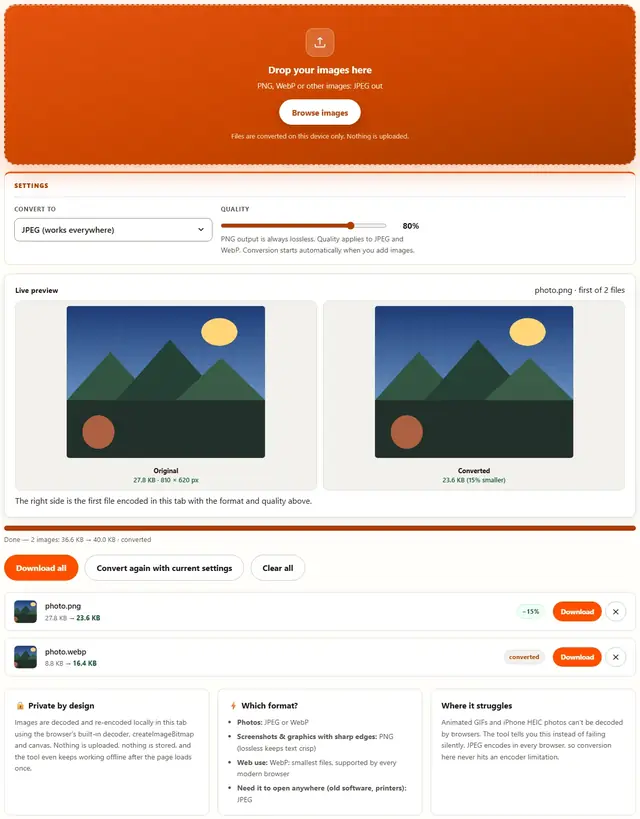
Drop your images here
PNG, WebP or other images: JPEG out
Files are converted on this device only. Nothing is uploaded.
PNG output is always lossless. Quality applies to JPEG and WebP. Conversion starts automatically when you add images.
The right side is the first file encoded in this tab with the format and quality above.
Image To JPEG — illustrated, step by step
How to convert an image to JPEG
Three steps, about ten seconds, no technical skills needed.
Add your images
Drag PNG, WebP or other image files onto the dropzone, or click to browse. Batch conversion is supported.
Quality is already set
Output is locked to JPEG at 90% quality, the sweet spot for photos and scans. The slider stays available if you need smaller files.
Download the JPEGs
Every row shows bytes saved. Download one file or all of them at once; .jpg and .jpeg are the same format, so either extension works.
JPG vs JPEG: same file, same rules, three jobs
.jpg and .jpeg are the same format. The only difference is three letters of filename extension and forty years of Windows-era 8.3 filename history. Converting between them changes nothing about the pixels — this page exists because people search both names.
Three jobs, one tool:
- Uploading to a portal that validates the extension strictly (yes, they exist). Rename without re-encoding where the tool offers it — this page re-encodes cleanly, so the file passes both the extension check and any real JPEG validation.
- Bulk-converting a folder of mixed formats (PNG, WebP, BMP) to JPEG for a legacy system, email blast, or print shop. Batch works here — hundreds of files, one dropzone.
- Rescuing photos from WebP that your mother's email client can't open. WebP to JPEG, done.
Converting from JPEG to JPEG? We won't stop you, but that's re-saving the lossy file — every JPEG-to-JPEG pass throws more away. If you're chasing a size target, resize instead. If you're chasing a format change, you're already done.
Honest note: if your file has an alpha channel (transparent PNG) converting to JPEG will paint the transparent areas white — not black, not checkered, white. If that matters, use PNG instead.
Why convert in the browser?
Because there is no upload step, conversion here is safe for confidential documents, client work and personal photos. The files never leave the device you're sitting at. It also works offline once the page has loaded, and a whole folder of images can be converted and downloaded in one go. Details in our file-handling policy.
Image to JPEG: FAQ
Is .jpg different from .jpeg?
No: identical format, two extensions. Windows historically allowed only three-letter extensions, hence .jpg; other systems kept the four-letter .jpeg. This tool can save either name.
Can I convert WebP to JPEG?
Yes: WebP decodes in every modern browser, and JPEG encodes everywhere, so the conversion is fully supported. Drop .webp files in and they come back as .jpeg.
Will transparency survive?
No: JPEG has no alpha channel, so transparent regions are filled with white before encoding. Use Image to WebP or Image to PNG when transparency must stay.
Are my files uploaded?
No. Everything runs in this browser tab with the Canvas API: no upload step, no server processing, works offline after the page loads.
.jpg, .jpeg and when JPEG is the right format
People search for both spellings because both extensions are everywhere in the wild. The bytes inside are the same format either way, so the conversion question is never about the extension: it is about whether JPEG's lossy, photograph-friendly encoding suits the image.
JPEG suits continuous-tone content: photos, scans, gradients. It does not suit sharp-edged graphics, text screenshots or images with transparency: those lose crispness or alpha entirely. For those, convert to PNG (lossless) or WebP (smaller, keeps transparency) with the Image Converter instead.
Also shrinking images?
The Image Compressor handles JPEG, PNG and WebP with a live quality slider: same privacy, same speed.
Open Image Compressor