Image to JPG Free: Convert Any Image to JPEG
Convert PNG, WebP and other images to JPG right in your browser: drop your files, watch each one convert automatically, download sharp JPEGs in seconds. No upload, no signup.
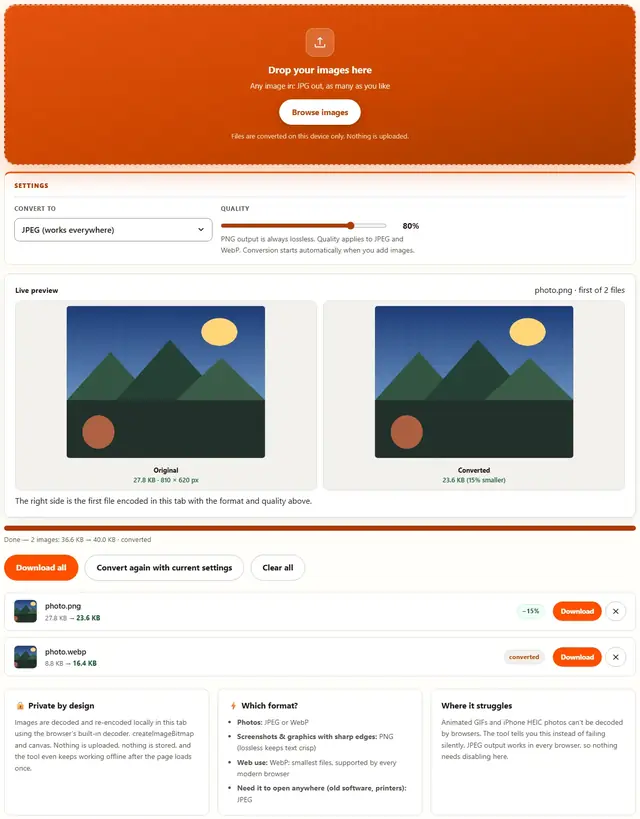
Convert your images to JPG
Drop your images here
Any image in: JPG out, as many as you like
Files are converted on this device only. Nothing is uploaded.
PNG output is always lossless. Quality applies to JPEG and WebP. Conversion starts automatically when you add images.
The right side is the first file encoded in this tab with the format and quality above.
Image To JPG — illustrated, step by step
How to convert an image to JPG
Three steps, about ten seconds, no technical skills needed.
Add your images
Drag PNG, WebP or other image files onto the dropzone, or click to browse. They convert one after another as a batch.
The JPG is preselected
Output format is locked to JPEG with quality at 90%: sharp photos at a fraction of the original size. Lower it if you need even smaller files.
Download the JPGs
Each row shows the before and after size. Download one file or all converted JPEGs at once.
Why everything ends up JPG eventually
Every file you ever convert to JPG is converted for the same reason: something downstream — an inbox, a portal, a CMS, a 2009-era app — demands JPG and refuses to negotiate. JPG isn't the best format; it's the mandatory format.
Converting well means deciding two things before you click:
- Quality. 80% is the default for a reason — visible artifacts are rare, savings are real. Push to 60% only when a size limit is breathing down your neck, and never below 50% unless the file is already throwaway quality.
- Size. Converting PNG (which might be 6 MB) to JPG without resizing still leaves you with a 6 MB file of better compression. Set the max-width to 2048 px for web or 1600 px for forms; that one number matters more than the quality slider.
What you lose: transparency and anything that needs pixel-perfect storage. JPG stores light, not geometry — fine text inside the image blurs slightly, logos against transparent backgrounds arrive on white. If you need either, that's what Image to PNG or Image to WebP are for.
What you gain: a file every human, machine and 2010-era form on Earth will open without complaint.
Why convert in the browser?
Because there is no upload step, conversion here is safe for confidential documents, client work and personal photos. The files never leave the device you're sitting at. It also works offline once the page has loaded, and a whole folder of images can be converted and downloaded in one go. Details in our file-handling policy.
Image to JPG: FAQ
Which formats can I convert to JPG?
PNG and WebP convert directly. Animated GIFs and iPhone HEIC photos can't be decoded by browsers, so the tool refuses them with a clear message instead of returning a broken file.
Does converting to JPG lose transparency?
Yes: JPEG has no alpha channel, so transparent areas are filled with white. If transparency matters, convert to WebP with the Image to WebP tool instead.
What quality setting should I use?
90% is the default and suits photos and scans. Around 80% halves file size again with no visible difference at screen size; below 70% artifacts start showing on detailed photos.
Is my image uploaded?
No. Decoding and re-encoding happen entirely in this browser tab using the browser's own canvas encoder. Nothing is sent anywhere.
Why convert to JPG?
JPG opens everywhere: old Windows viewers, printers, messaging apps, email clients, content management systems that whitelist extensions. When a file must simply work on someone else's machine, JPEG is the safe answer, and this page locks the output to it so you can't pick wrong.
The size drop is the other reason. A 3 MB PNG screenshot typically becomes a 200-400 KB JPEG at 90% quality: the photographic detail survives, the lossless overhead doesn't. Photos captured as WebP by modern phones also shrink further as JPEG when the recipient's software predates WebP support.
Also shrinking images?
The Image Compressor handles JPEG, PNG and WebP with a live quality slider: same privacy, same speed.
Open Image Compressor