Merge PDF and Images Free Online, No Signup
Drop PDFs and photos together, arrange them in one list, and merge everything into a single document. Copied PDF pages keep their vector quality, and each photo becomes a clean page sized to fit or to A4. The merge runs in this tab.
Merge your PDF and images
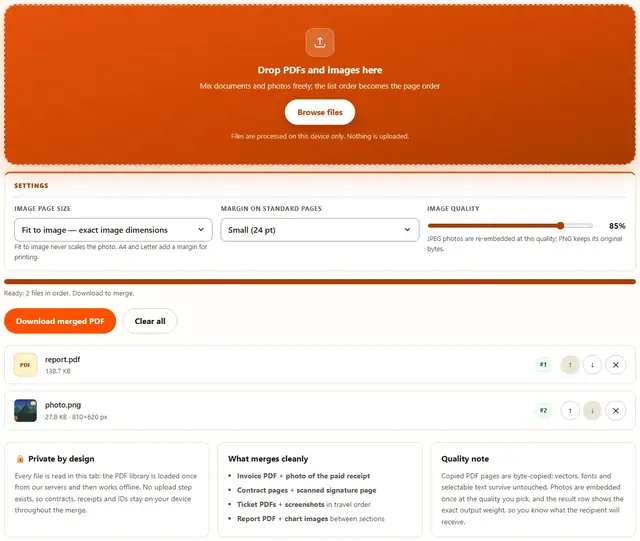
Drop PDFs and images here
Mix documents and photos freely; the list order becomes the page order
Files are processed on this device only. Nothing is uploaded.
Fit to image never scales the photo. A4 and Letter add a margin for printing.
JPEG photos are re-embedded at this quality; PNG keeps its original bytes.
PDF Image Merger — illustrated, step by step
How to merge a PDF with images
Three steps, no accounts, no watermarks on the output.
Drop the files
Drop any mix of PDFs and JPG, PNG or WebP images on the box. Each one appears in the list in the order you added it.
Arrange the order
Use the arrows to move pages and photos so the sequence reads correctly, then pick how image pages are sized.
Download
The merged PDF's page count and file weight appear in the result row. One click saves it; nothing is uploaded anywhere.
Why merge in the browser?
Because the documents being combined are usually the sensitive ones: signed contracts, identity scans, medical letters. Keeping the merge in the tab means the files never touch a server, there is no account and no queue, and the output is ready the moment the last file loads. Details are in our file-handling policy.
Troubleshooting
Are my files uploaded when I merge a PDF with images?
No. The PDF is parsed and rebuilt with an in-browser PDF library, and each image is embedded from its bytes right here in this tab. There is no upload endpoint, so signed contracts and ID scans never leave your device.
How do image pages get sized?
Fit to image makes each page exactly the image's own dimensions, which preserves it 1:1 with no cropping or scaling. A4 and Letter place the image centered on a standard sheet with a margin, which is what forms and printouts expect. Orientation follows the image automatically in every mode.
Which image formats can I mix in?
JPG and PNG embed directly and keep their quality. WebP, GIF and BMP are re-encoded to PNG in the browser first, which preserves transparency but can grow a large animated GIF to just its first frame, since a PDF has no concept of animation.
Can I put a photo between PDF pages?
Yes: that is the point of the tool. Every file, PDF or image, appears in one list in drop order, and the arrows reorder the whole sequence, so a photo receipt can sit right after the invoice page it belongs to before you merge.
Will the merged PDF keep the original PDF quality?
Copied pages are copied, not re-rendered: vector art, embedded fonts and text stay exactly as they were. Only the images you add are newly embedded, so the output quality equals the input quality throughout.
Does merging change my source files?
No, and it cannot: every input is read-only and the output is a brand-new document. The originals on your disk are untouched, and the tool shows the output's page count and file weight before you download.
Combining documents and photos correctly
The order list is where this tool earns its keep. Real paperwork is interleaved: an invoice, then the photo of the transfer receipt, then the signed acknowledgment. Merging PDFs alone cannot insert a photo, and combining images alone loses the document quality, so people end up printing and rescanning. This tool reads both kinds of file into one sequence, and the arrows reorder the whole mix before anything is written.
The image page size choice decides how the result behaves. Fit to image keeps every photo at its exact pixel dimensions, so nothing is scaled and nothing is cropped, which is right when the PDF is the final artifact and will be read on screen. A4 and Letter put each photo on a standard sheet with a margin, which is right when the document will be printed or must match a form's paper size. Orientation follows the photo automatically in both, so a landscape screenshot does not end up on a portrait page.
| Combination | Page size | Why |
|---|---|---|
| Invoice + receipt photo | A4 | Prints as one matching sheet |
| Contract + scanned signature | Fit to image | Keeps the scan 1:1, unscaled |
| Tickets + hotel screenshots | Fit to image | Screen-native size, crisp text |
| Report + chart images | A4 or Letter | Consistent paper for the whole report |
| ID front and back | Fit to image | No crop, exact proportions |
Merge, split and convert
This tool builds one document out of many files. Its siblings do the reverse operations: PDF Splitter pulls a merged document back into pieces, Extract PDF Pages keeps a chosen range, and PDF Merger combines pure PDFs without any images in the mix.
If the merged result needs to shrink before sending, the PDF Compressor re-encodes embedded images and shows the exact bytes saved. Every tool here works on the same principle: the file never leaves the tab.
Merged PDF too heavy to email?
The PDF Compressor shrinks documents with a quality slider and shows you the exact bytes saved: same privacy, same speed.
Open PDF Compressor