Word Counter: Words, Characters, Time & Density
Paste your text and get live word count, character count, sentence count, reading time and keyword density. Built for writers, students, SEOs, lawyers — anyone who has ever stared at a 47-page contract wondering how long it would actually take to read.
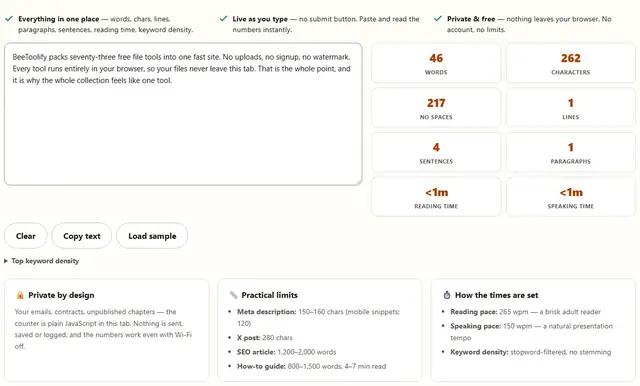
- Everything in one place — words, chars, lines, paragraphs, sentences, reading time, keyword density.
- Live as you type — no submit button. Paste and read the numbers instantly.
- Private & free — nothing leaves your browser. No account, no limits.
Top keyword density
Word Counter — illustrated, step by step
How the count is actually computed
Words are runs of non-whitespace characters — text.trim().split(/\s+/). That matches the usual editors on normal prose and diverges at the edges: a lone em dash between spaces counts as a token, CJK text with no spaces across tokens undercounts, and a decimal like 3.5 nudges the sentence regex into counting "3." as one sentence. Characters are JavaScript's UTF-16 code units, so an emoji outside the basic plane counts as 2. None of this is a bug — it is what the numbers mean.
Versus Word and Google Docs: both count the same whitespace runs for body text, but Word can also count footnotes, endnotes and text boxes, which this counter never sees — it only reads the textarea. Paragraphs split on blank lines, lines split on \n. Everything you paste is counted exactly as the bytes arrive — straight quotes, curly apostrophes, stray tabs and non-breaking spaces included — so a document that "looks blank" can still carry dozens of invisible separators.
- Pace bases — reading is computed at 265 wpm, speaking at 150 wpm; both are averages, not your audience. Scanners run faster, technical readers slower.
- Keyword density — lowercase tokens of 3+ letters, stopword-filtered, no stemming:
runandrunningare separate words here. - Density limits — above ~2–3% repetition, copy reads as stuffed; no search engine publishes a density target, so treat the table as a mirror, not a grade.
- Meta descriptions — 150–160 chars (115–120 mobile). It's a display-pixel budget, not a hard rule — Google may rewrite yours entirely, so front-load the value.
- Honest limit — the density table is Latin-script only; pure CJK or Cyrillic text yields zero keywords, not zero relevance.
Why paste private text here?
Your emails, contracts, unpublished chapters, legal filings — we never see them. The counter is pure JavaScript, runs on this device, and nothing is transmitted. Even if the Wi-Fi is off, the count still works. That's what "client-side" actually means.
Count what actually matters
Writers know word count. Everyone else stares at the blank because they don't know what to inspect first. Here's the honest guide:
- Blog post / SEO article: target 1,200–2,000 words. Check readability by reading time — 6–9 minutes keeps visitors engaged.
- Meta description: 150–160 characters. The 160th is usually invisible on mobile; write for 120 if you care about mobile snippets.
- Twitter/X post: 280 characters (yes, really — even the long-form tier is weighted by this).
- YouTube description: the first 120 characters are the preview; space to 5,000 before the fold.
- Legal contracts: word count is incidental, but the top keyword density exposes padding ("shall" appearing 40 times tells you a lot).
- Ad copy: every word carries cost. Shorter wins. This counter shows you exactly how many you used.
Word counter FAQ
What counts as a word?
Any non-whitespace sequence of characters. Hyphenated terms count as one word — "well-known" is one word. Punctuation alone doesn't count. This matches MS Word, Google Docs, and every honest counter on the web.
Why does my character count differ from Word's?
Word counts characters differently by default (with and without spaces). This tool shows both. Also check whether you pasted rich text — the tool strips formatting and counts raw Unicode, Word includes hidden field codes sometimes.
Is my text stored anywhere?
No. Not in localStorage, not in a cookie, not on our servers. The JavaScript reads the textarea and computes. When you close the tab, it's gone.
What's a good reading time for a blog post?
Long enough to be thorough, short enough to hold attention. 800–1,500 words for how-to guides (4–7 minutes). 2,000+ for deep dives and legal explainers. The 265 wpm figure used here is a conservative reader pace; scanners read faster.
Can I check meta description length here?
Yes — paste your meta description into the box. Stay under 160 characters for desktop Google, under 120 for mobile snippets. Google may rewrite longer descriptions, but a well-formed one usually wins.