Add Text Watermark to PDF Free
Stamp DRAFT, CONFIDENTIAL or your company name across a PDF without installing anything. Pick the opacity, size, rotation, color and placement, apply it to every page or just a range, and export. No upload, no signup, and your file never leaves your device.
Watermark your PDF
Drop a PDF here
One file at a time: the watermark is drawn on every page you choose
The PDF is opened on this device only. Nothing is uploaded.
Latin letters, numbers and basic punctuation work best.
20 to 40% keeps pages readable; 100% becomes a solid stamp.
36 pt reads clearly on letter and A4; use 12 to 18 pt for a footer-style mark.
Diagonal always tilts, even at 0° rotation.
Light gray is the classic watermark; red reads as an alert.
Examples: 1-3, 5, 7-9. Leave as shown to stamp every page.
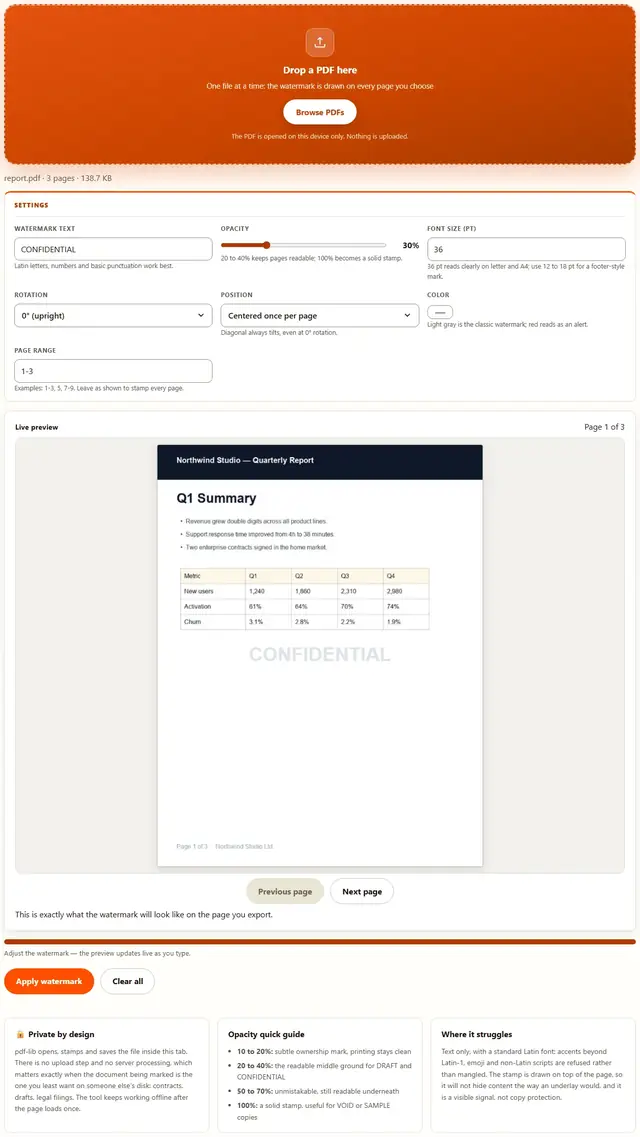
This is exactly what the watermark will look like on the page you export.
PDF Watermark — illustrated, step by step
How to watermark a PDF
Three steps, about a minute, no technical skills needed.
Add your PDF
Drop a PDF on the dropzone or click Browse. The tool reads the page count locally and fills in the full page range so you can start from "every page" and narrow later.
Set the text, look and pages
Type your watermark, then choose opacity, size, rotation (0, 45 or 90 degrees), position (centered, tiled or diagonal) and color. The live preview renders the page with the watermark on it as you tweak, and the page range box limits where it lands.
Apply and download
Click Apply watermark. A progress bar walks through the pages, and the new file downloads as name-watermarked.pdf, so your original stays untouched.
Why watermark in the browser?
Because there is no upload step, watermarking here is safe for the documents you would never paste into a random website: merger agreements, unreleased financials, client drafts. The file never leaves the device you're sitting at, and the finished copy is back in your downloads in under a minute. Details in our file-handling policy.
Troubleshooting
Will a watermark stop people from copying my PDF?
No watermark stops a determined person: someone can still screenshot or reprint. What it does is make casual misuse obvious and add a visible claim of ownership on every printed or forwarded page. Watermarking is a signal, not a lock; real protection comes from permissions and contracts, not pixels.
Can I watermark only some pages?
Yes. The page range box accepts the same syntax as the PDF Splitter, such as 1-3, 5, 7-9. Leave it set to the full range to stamp every page, or narrow it to a cover page, a draft mark on even pages, or any pattern you need.
The watermark text shows up as garbled characters
PDF standard fonts only hold Latin-1 characters, so letters with accents, curly quotes, emoji and non-Latin scripts can't be drawn with them. Stick to basic Latin letters, numbers and common punctuation; the tool tells you if the font refuses the text instead of writing broken glyphs.
Can I use an image or a logo as a watermark?
Not in this version: it stamps text only, because text stays crisp at any zoom level and needs no image file to ship around. For a logo mark, render your artwork to PNG with the SVG to PNG tool and composite it in a desktop editor, or stamp your company name as text here.
Are my PDFs uploaded?
No. pdf-lib loads and edits the file inside this browser tab. There is no server in the path, so confidential contracts and drafts stay on your device. You can verify it: open DevTools Network, apply a watermark, and watch nothing get sent. Details are in our file-handling policy.
Why does my watermark sit behind the page content?
The text is drawn with the opacity you chose, so it blends with whatever is underneath, which is what makes it read as a watermark rather than a stamp. Raising opacity to 100% makes it solid, and most people find 20 to 40% is the range where pages stay readable.
Does the watermarked file keep its original quality?
Yes. The pages themselves are copied, not re-rendered, so images and text stay exactly as they were. Only a small text layer is added on top, so the file size changes by a few kilobytes at most.
Can I add a DRAFT or CONFIDENTIAL watermark to a PDF?
Yes. Type DRAFT, CONFIDENTIAL or any custom text, then choose the size, rotation, color and opacity so it stays readable without covering the content. You can apply it to every page or only a page range, which is useful for contracts and review copies.
How to add a DRAFT watermark to a PDF (and what it actually does)
A watermark is a label the document wears on every page: DRAFT for the version you're still revising, CONFIDENTIAL for the one going to three people, SAMPLE for the template you're handing out, or your company name for anything leaving the building. Its job is to make the status of a page obvious even after the page has been separated from the email that explained it. Pages travel. A single page of a proposal ends up in someone else's deck, and the only context that survives is whatever is printed on it.
What a watermark does not do is prevent anything. Any PDF can be screenshotted, printed or re-saved, and sophisticated viewers can sometimes paint over a top-layer stamp. Treat watermarking as communication, not security: it tells a reader who owns this, what stage it is in, and that forwarding it without permission will be noticed. For actual enforcement you need access controls and, eventually, lawyers. For everything short of that, a clear mark on page one through page forty does most of the work.
There is a craft side too. A watermark that covers the body text at 80% opacity makes a document unreadable and annoys the exact people you sent it to. A watermark at 20 to 40% sits behind the content as a gentle claim. This tool gives you the opacity slider, three rotations, three placements and a color picker, and the live preview shows exactly what will be drawn before you commit, so the difference between "polished" and "hostile" is one drag of a slider.
| Watermark | Typical opacity | Placement | What it communicates |
|---|---|---|---|
| DRAFT | 20 to 35% | Diagonal, large | Not final, do not circulate |
| CONFIDENTIAL | 25 to 45% | Centered or tiled | Restricted audience, handle with care |
| SAMPLE | 50 to 70% | Tiled | This copy is a demonstration |
| Company name | 10 to 20% | Centered, small | Ownership, on templates and exports |
| VOID | 70 to 100% | Tiled, large | This copy is cancelled |
How a text watermark is drawn inside a PDF
The stamp is real vector text, not a screenshot of text. When you click Apply, pdf-lib (the same library the other BeeToolify PDF tools use) opens the file, embeds the standard Helvetica Bold font, and asks each chosen page to draw your string at a chosen point size, color, angle and opacity. Vector text means the watermark stays razor sharp at any zoom level and prints exactly, and it means the change to your file is tiny: a few kilobytes per page rather than a re-rendered image of the whole document.
Placement is computed per page, because PDFs do not share one page size. Letter, A4, legal and scanned landscape pages all get their own center point, so a "centered" watermark is centered on that page rather than on some average. Tiled mode lays a grid of stamps across the page, spaced off the measured width of your text at the chosen size, which is why a long string tiles fewer columns than a short one. Diagonal mode tilts the text (45 degrees by default) and centers the rotated box on the page, the classic REVIEW COPY look.
Rotation is handled the same way a print shop would do it: the text origin is shifted by the rotated half-extents of the string, so a 90-degree stamp is centered on its side instead of drifting off the edge. Opacity is applied to the text only and never to the page under it.
Centered, tiled or diagonal: choosing the right placement
Placement decides whether a watermark reads as professional or as vandalism, so it is worth matching the pattern to the job rather than picking a favorite. Centered is the default for a reason: one large, quiet stamp in the middle of the page says DRAFT without fighting the content, and it is the pattern most reviewers expect on a document circulating for comment.
Tiled is the pattern for sheets that will be printed, sorted and possibly separated. A repeated grid means no single page can be plucked out and passed off as final, which is why SAMPLE, VOID and NOT FOR DISTRIBUTION usually appear tiled. Keep opacity low to medium on tiled stamps, because five copies of a dark stamp across one page quickly stop the page from being read at all.
Diagonal is the classic REVIEW COPY treatment: one long stroke from corner to corner, tilted 45 degrees (or on its side at 90). It is the most visible of the three without going tiled, and it is the pattern that photographs best when someone screenshots a page for a chat thread, which is exactly the situation where you want the mark to survive.
| Placement | Stamps per page | Best for | Watch out for |
|---|---|---|---|
| Centered | One | DRAFT, ownership marks, cover pages | Raise the size on wide pages so it is not missed |
| Tiled | A grid, measured from your text | SAMPLE, VOID, printed handouts | Keep opacity low so the page stays readable |
| Diagonal | One, tilted | REVIEW COPY, screenshots, circulation | Very long text can run off the corners; shorten it |
Whatever you pick, the live preview under the controls renders the actual page with your watermark on it, so you can sanity check the result at a glance before spending time on a long file. Flip between pages with the Previous/Next buttons to make sure every page you ranged gets the treatment. And if the sequence of pages is wrong on top of everything else, fix that first in the PDF Reorder.
Use cases: five documents that need a watermark more than they need a password
- A pitch deck sent to three investors. Stamp CONFIDENTIAL at 30% opacity across every page. If a page shows up in someone else's thread, the mark travels with it and everyone knows where it came from.
- A contract draft going back to the other side. DRAFT, diagonal, medium gray. It stops the counterparty from filing the current version as the agreed one, and it reminds your own team that terms are still open.
- A price list with a date on it. Put your company name and "PRICES AS OF [MONTH]" at low opacity on page one, then use the page range box so only the cover carries it.
- A printable template you give away. SAMPLE, tiled, at 50% or so. Customers see exactly what they are getting, and the free version cannot be quietly reused as if it were the premium one.
- A cancelled invoice or an obsolete form. VOID at high opacity, tiled. It is the fastest way to make sure a printed copy in a pile of paperwork cannot be mistaken for live.
Watermarking pairs naturally with the other page tools: reorder first if the sequence is scrambled, split out the pages you do not want to mark, and compress at the end so the stamped file still fits an email attachment limit. Guides for the surrounding steps live on our blog, including how to compress a PDF without losing quality.
What we actually tested
This page makes specific claims, so here is how they were checked. Open DevTools, go to the Network tab, drop a PDF and apply a watermark: the only requests you see are the page's own HTML, CSS and JavaScript, plus the pdf-lib file fetched the first time you stamp something. Nothing uploads, because the load, the draw and the save all happen inside your tab.
On fidelity: we watermarked a text-heavy report and a photo-heavy brochure, then compared the pages with the originals. Text selection, search and zoom behaved identically, which is what "copied, not re-rendered" should mean in practice. On placement: centered stamps landed in the true center of Letter, A4 and a scanned landscape page, and tiled spacing stretched for long strings instead of overlapping. On rotation: 90-degree stamps were centered on their side rather than drifting toward the corner, because the text origin is shifted by the rotated extents of the string.
Two honest details from testing. First, the standard font holds Latin-1 only, so typing an em dash, an emoji or a non-Latin script produces a clear error rather than a mangled stamp. Second, a tiled stamp on a 200-page file takes a few seconds and the progress bar walks through it; the output grows by roughly a few kilobytes per stamped page, not by megabytes. We also confirmed the file-size change disappears almost entirely when you pick a short string at low opacity.
Limits: what this watermark tool won't do, and why
An honest list beats a surprised user:
- Text only, in a standard Latin font. Accents beyond Latin-1, curly quotes, emoji and non-Latin scripts are refused, not mangled. The tool reports the problem instead of writing broken glyphs into your file.
- No image or logo watermarks. Embedding arbitrary images is a much larger surface for broken files and privacy surprises, so this version stays with vector text. Render logos to PNG with the SVG to PNG tool if you need to composite one in an editor.
- Not copy protection. The stamp is a visible layer, not encryption. Someone with a PDF viewer can sometimes remove it, and anyone can screenshot the page. Watermarks communicate; they do not enforce.
- Drawn on top of the content. There is no "behind the text" mode, so a very dark stamp will sit over your content rather than under it. That is also why the opacity slider defaults to 30%.
- Password-protected PDFs are refused. Encrypted files cannot be opened by browser JavaScript, so the tool says so up front. Unlock the file in a desktop app first, or Print to PDF to make an unlocked copy.
- Form fields may lose their appearance. Page content is preserved, but interactive widget annotations are not rebuilt. If your file is a fillable form, stamp a copy and keep the original as your master.
Need to fix page order, split the file or shrink it afterwards? Those live on the Tools page, and every one of them runs locally in the same way this one does.
Also shrinking a PDF right now?
The PDF Compressor lightens a stamped PDF before you send it: same privacy, same speed, no quality slider to guess at.
Open PDF Compressor