WebP to JPEG Free: Make .webp Files Open Anywhere
Convert WebP images to JPEG right in your browser: .webp files become .jpg images that open in old viewers, printers and messaging apps. No upload, no signup.
Convert your WebP images to JPEG
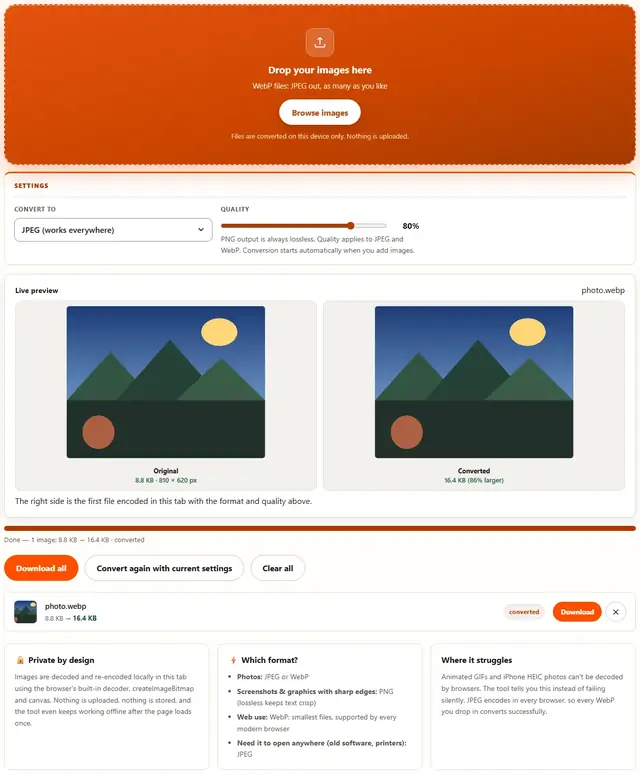
Drop your images here
WebP files: JPEG out, as many as you like
Files are converted on this device only. Nothing is uploaded.
PNG output is always lossless. Quality applies to JPEG and WebP. Conversion starts automatically when you add images.
The right side is the first file encoded in this tab with the format and quality above.
WebP To JPEG — illustrated, step by step
How to convert WebP to JPEG
Three steps, about ten seconds, no technical skills needed.
Add your WebP files
Drag .webp images onto the dropzone, or click to browse. They convert one after another as a batch.
JPEG is preselected
Output is locked to JPEG at 90% quality. Lower the slider if you need even smaller files; transparency is filled with white, as JPEG has no alpha channel.
Download the JPGs
Each row shows the WebP size next to the JPEG size. Download one file or all converted JPEGs at once.
When the modern web hands you something the old world can't read
WebP is great — until it isn't. You download a file from a website or get emailed an attachment and your photo gallery shrugs. Older Windows Photo Viewer, some Android gallery apps, MS Office inserted pictures, print shops' upload portals, government form validators — the common thread is: they all silently hate WebP.
Converting WebP back to JPEG solves all of that in one step:
- Email and portals that enforce "JPG only" validators.
- Presentations and print workflows that choke on WebP silently or show nothing.
- Re-uploading old photos to sites that recompress anything you give them — a clean JPEG at quality 85 is the best starting material.
What happens to quality on the way back: WebP and JPEG are both lossy, and converting one to the other is always a lossy re-encode — there's no way around physics. The damage is usually minor if you pick quality 80–85 and the source was decent. It never improves a mushed photo; nothing can.
What happens to transparency: it becomes white. JPEG has no alpha channel and never will. If the image is a logo that needs to sit on any background, convert to PNG instead — that's the format that keeps the background see-through.
Why convert in the browser?
Because there is no upload step, conversion here is safe for confidential documents, client work and personal photos. The files never leave the device you're sitting at. It also works offline once the page has loaded, and a whole folder of images can be converted and downloaded in one go. Details in our file-handling policy.
WebP to JPEG: FAQ
Why can't the other person open my WebP?
Older Windows photo viewers, some messaging apps and legacy software predate WebP support and show a blank thumbnail or an error. Converting to JPEG fixes it: every device from the last 30 years opens .jpg.
Does the conversion lose quality?
WebP decodes fully, then re-encodes as JPEG at the quality you pick. At 90% the difference is invisible at screen size. Converting an already-compressed WebP does add one more lossy pass, which is inherent to any lossy-to-lossy conversion.
What happens to transparent WebP files?
JPEG has no alpha channel, so transparent areas are filled with white. If you need transparency preserved, convert to PNG with the Image to PNG tool instead.
Are my files uploaded?
No. Everything runs in this browser tab with the Canvas API: no upload step, no server processing, works offline once the page has loaded.
When WebP causes problems, and JPEG fixes them
WebP solved a real problem (web pages shipping too many bytes) but created a compatibility one: files saved from Chrome, downloaded from a website, or exported by a modern phone land on machines that predate WebP decoders. The JPEG copy is the universal solvent: email it, print it, attach it to a form that whitelists .jpg.
The conversion decodes WebP fully before re-encoding, so output quality is entirely in your hands: 90% suits photographs, 95% when the image will be zoomed or printed. Photographic WebPs convert almost losslessly; heavy-artifact source files stay artifacted, since no conversion can add detail the source never had.
Also shrinking images?
The Image Compressor handles JPEG, PNG and WebP with a live quality slider: same privacy, same speed.
Open Image Compressor