Images to GIF Free Online, No Signup
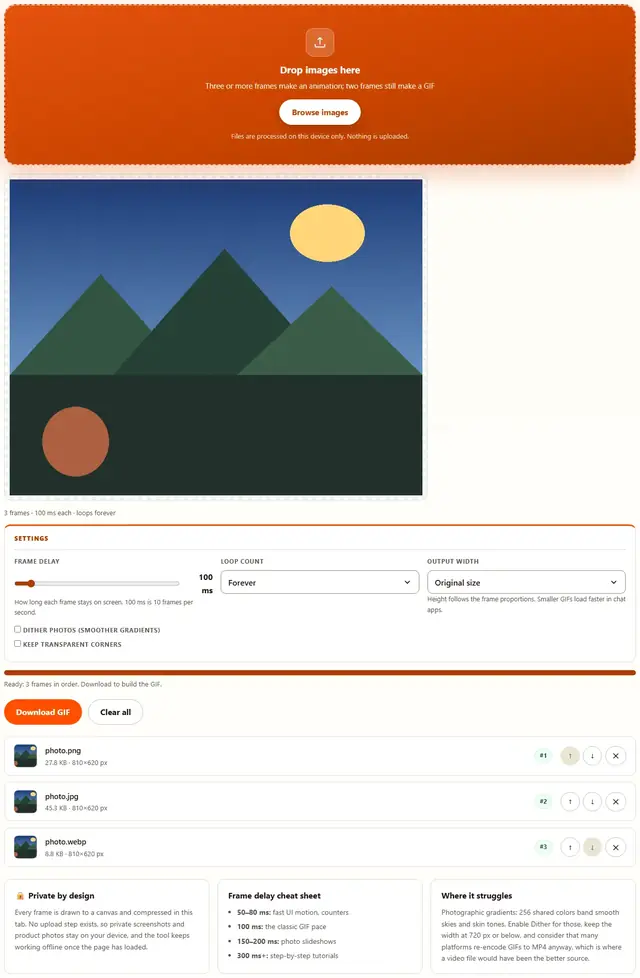
Drop a set of images in the order you want them to play, set the frame delay and loop count, and download an animated GIF. The palette, compression and assembly all happen in this tab.
Build your animated GIF
Drop images here
Three or more frames make an animation; two frames still make a GIF
Files are processed on this device only. Nothing is uploaded.
How long each frame stays on screen. 100 ms is 10 frames per second.
Height follows the frame proportions. Smaller GIFs load faster in chat apps.
Images To GIF — illustrated, step by step
How to make a GIF from images
Three steps, no accounts, no watermarks on the output.
Drop the frames
Drop two or more JPG, PNG or WebP images on the box. They play in the order shown in the list.
Set the pace
Pick the frame delay and whether the GIF loops forever. The width control shrinks the result for chat apps.
Download
The encode runs for a moment, then the GIF downloads with its exact file weight shown. Nothing is uploaded anywhere.
Why build GIFs in the browser?
Because the frames are often the things you would not upload: a screen recording of an internal tool, a private conversation, a product not yet announced. Encoding locally means the files never touch a server, there is no account and no queue, and the GIF is ready the moment the last frame loads. Details are in our file-handling policy.
Troubleshooting
Are my images uploaded when I make a GIF?
No. Every frame is drawn to a canvas, quantized to a 256-color palette and LZW-compressed by code running in this tab. There is no upload endpoint, so screenshots, product shots and private photos stay on your device.
What frame delay should I pick?
Match the rhythm to the content. 100 ms (10 fps) suits status changes and simple loops, 60–80 ms feels snappy for UI recordings, and 200 ms or more reads better for photo slideshows where each frame deserves a moment. The GIF format stores hundredths of a second, so 80 ms becomes 8 hundredths exactly.
Why do GIF colors look slightly off?
Because a GIF can hold only 256 colors per frame, and this tool builds one shared palette from all frames so the colors stay stable while it plays. Smooth photo gradients band a little; flat graphics, screenshots and logos come out essentially exact. When you need true color, an MP4 or WebP animation is the better container.
How many frames can I add?
As many as your device can hold: each frame is decoded at full resolution before the palette is built. A hundred 800-pixel screenshots encode in a few seconds; several hundred large photos take longer and produce a heavy file, because every frame is stored in full with no inter-frame compression.
Can the GIF loop forever?
Yes, that is the default: the tool writes the Netscape loop extension that browsers and chat apps read as infinite repetition. You can also set it to play once or a specific number of times, which suits tutorials and one-shot notifications.
Will the GIF play in WhatsApp, Slack and Twitter?
Yes. Animated GIFs are natively supported by every mainstream chat app, forum and social platform, though some (Twitter/X, Facebook) convert them to MP4 behind the scenes, which can subtly soften them. Keep the frame count modest and the dimensions at 480–720 px wide for the best result after their re-encode.
Pacing an animation that feels right
Frame delay is the whole feel of a GIF. Too fast and the animation blurs into noise the eye cannot follow; too slow and it stutters like a broken projector. The useful reference point is ten frames per second — one hundred milliseconds per frame — which is where most memorable loops live: fast enough to feel alive, slow enough that each frame registers. Simple two-state loops, like a bouncing arrow or a blinking cursor, sit slightly slower at one hundred fifty milliseconds, because the viewer needs to register the change, not just the motion.
The other half of the feel is frame count against loop length. A hundred frames at fifty milliseconds is five seconds of dense motion and a heavy file; the same content as twenty frames at two hundred fifty milliseconds reads as deliberate stop-motion and weighs a fifth as much. When a sequence feels frantic, before reaching for slower delays try deleting the in-between frames: fewer, more distinct poses usually reads better than many similar ones, and the file shrinks as a side effect.
| Content | Delay | Rough duration |
|---|---|---|
| Counter, spinner, blink | 50–80 ms | 1–3 s loop |
| UI recording, demo | 80–120 ms | 3–6 s loop |
| Photo slideshow | 150–300 ms | 5–10 s total |
| Tutorial steps | 300–1000 ms | readable pace |
GIF, video and WebP
GIF remains the one animation format every chat app, forum and older system displays without a player, which is exactly why it survives despite its 256-color limit and inefficient compression. When the frames are photographs or the loop is long, a small MP4 weighs a fraction of the GIF at better quality, and modern chat apps autoplay it just as seamlessly.
For this site's scope, GIF is the right call when the audience is a comment thread or a documentation page: drop the frames here, keep the width at 720 px, and the result plays everywhere. If the source is a PDF or a set of documents rather than pictures, PDF to Image renders the pages first, ready to drop back in as frames.
Frames are PDF pages?
Render them to images first with PDF to Image, then drop the PNGs here: same privacy, same speed.
Open PDF to Image