QR Code Generator: Free, No Watermark, No Signup
Free QR code generator: it runs on your device: no watermark, no signup, no tracking pixels. Paste a URL or text, download the SVG or PNG, done.
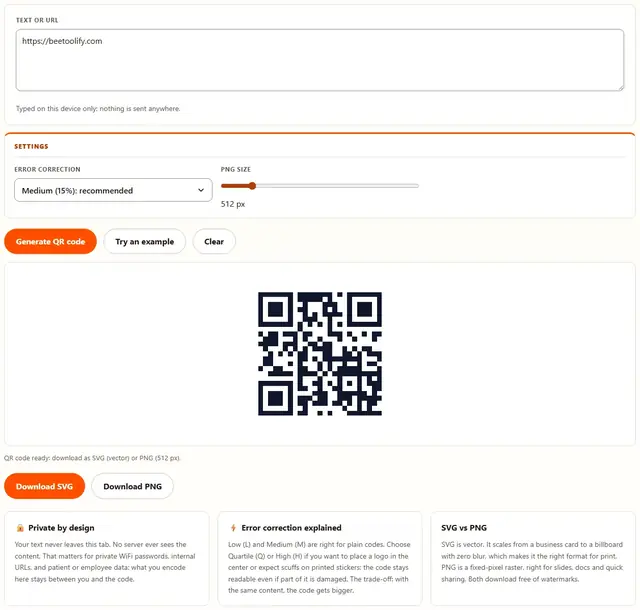
Generate your QR code
Typed on this device only: nothing is sent anywhere.
QR Generator — illustrated, step by step
How to make a QR code
Three steps, no signup, and the whole thing runs in this tab.
Paste your text or URL
Type or paste anything into the box: a link, a WiFi password, a short message. Nothing is uploaded while you type.
The code updates as you type
Pick an error correction level and a PNG size if you need one. Medium and 512 px are sensible defaults for screens and print.
Download SVG or PNG
Grab the vector SVG for print or the high-res PNG for slides and sharing. No watermark, no attribution required.
How QR generation actually works
Where people use these codes
Restaurant menus, business cards, event tickets, WiFi sharing, resumes and packaging: a QR code is just a compact way to hand someone text without typing it. Because generation happens entirely on your device, it's also one of the few tools that's safe to use with a WiFi password or an internal URL.
Honest printing tip: keep a quiet zone (a white border around the code) when you place it in a layout, and test-scan the printed result at the actual size before a run. Small codes on dark backgrounds are the most common reason a scan fails, not the code itself.
Troubleshooting
The code is too dense for my content
QR codes cap at around 3,000 alphanumeric characters, and long content makes the pattern denser. Smaller modules are harder for cameras to read. Shorten URLs with their native short form or drop extra tracking parameters, and the code becomes much easier to scan.
It won't scan
Three usual causes: low-contrast edits (keep dark modules on a light background), a logo covering too much of the center, or a missing white margin around the code. Use the original download first: if that scans, the problem was an edit made afterwards.
Do the codes expire?
No. A QR code is just your text encoded as a pattern. Nothing depends on BeeToolify staying online. That's also why we can't track or revoke codes: once you download one, it's entirely yours.
Is my text uploaded anywhere?
No. The code is generated from your text inside this browser tab. No server ever sees the content. That's exactly why it's safe for private WiFi passwords, internal URLs and confidential data. See our privacy policy.
How do I make a WiFi QR code?
Use the text box with the standard string WIFI:T:WPA;S:NetworkName;P:yourpassword;;: T is the security type (WPA for most routers, nopass for open networks), S is the network name from the WiFi list, and P is the password. The trailing semicolons close the record. Scan it on your phone before printing.
Is this QR code generator free with no watermark?
Yes. Both the SVG and PNG downloads are free, with no account, no trial and no watermark. The output is dark modules on white and nothing else. The buttons appear as soon as a code is on screen, so there is no signup form in the way.
How big should I print a QR code so it scans?
A rule of thumb: about one foot of scanning distance per inch of printed size. A 2-inch code reads from roughly 1 to 2 feet, a 4-inch code from around 4 feet, an 8-inch code from about 8 feet. Keep the white border, keep dark modules on a light background, and test-scan one copy first.
What is a free QR code generator with no watermark and no signup?
Short answer: a free QR code generator with no watermark and no signup hands you the finished file and asks for nothing back: no account, no email capture, no logo stamped across the middle of your code. Paste text or a URL, watch it build, then download.
Two things are worth checking on any generator. First, watermarks: several free tools stamp their brand in the center or force a credit line underneath. This output is dark modules on white and nothing else. Second, signup walls: some sites block the download behind an email form. There is none here.
Generation runs locally from scripts that load once, so the code is built on your device rather than a server. Every result is static: the data lives inside the pattern, so it cannot expire or be billed later. Other file chores handled the same private way are on the tools page.
How do I make a WiFi QR code?
If you want a wifi QR code generator, you don't need a separate WiFi panel. The single text box here takes every payload, WiFi included. Phones read one standard plain-text string:
WIFI:T:WPA;S:NetworkName;P:yourpassword;;
Read it left to right. T is the security type: WPA covers almost every home and café router, WEP is for old equipment, nopass is for an open network. S is the network name exactly as the phone's WiFi list shows it, and P is the password. The two semicolons at the end aren't a typo; they close the record.
Three things trip people up: the network name is case-sensitive; a semicolon, comma, quote or backslash inside the name or password needs a backslash in front of it; and the password sits in clear text in the pattern, so treat a printed code like a written copy of the key. Nothing uploads here, so the string never leaves your machine.
Which content should I encode: a URL, WiFi, or plain text?
Encode the smallest thing that does the job: a short URL gives the easiest-to-scan pattern and covers most needs, a WiFi string comes next, and raw text works but makes the grid finer. For most people this is simply a free QR code generator for a URL: paste the link, download, print. What goes in the box, and what happens on scan:
| What you want | What to type in the box | What happens on scan |
|---|---|---|
| A website or menu page | https://example.com/menu: the full link, including https | Browser opens the page |
| A WiFi network for guests | WIFI:T:WPA;S:Name;P:password;; | Phone offers to join the network |
| A plain message or code | Any sentence or short paragraph | Scanning app displays the text |
| An email address | mailto:someone@example.com | Mail opens with the address filled in |
| A phone number | tel:+15551234567 | Dialer opens with the number ready |
Scan the code with your own phone before printing. If the wrong thing opens, the payload is wrong. The pattern can't be corrected afterwards.
How big should I print a QR code?
Size separates a working code from one people give up on. Rule of thumb: about one foot of scanning distance per inch of printed size.
| Printed size | Rough scanning distance | Typical spot |
|---|---|---|
| 1 in (2.5 cm) | about 1 ft | Business card |
| 2 in (5 cm) | about 1–2 ft | Table tent, menu card |
| 4 in (10 cm) | about 4 ft | Poster, handout |
| 8 in (20 cm) | about 8 ft | Storefront window |
| 16 in (40 cm) | about 15 ft | Open-house sign |
Keep the white margin the download includes: that is the quiet zone, and cropping it is the most common print mistake. Dark modules on light stock, matte rather than glossy, then test-scan one copy at real size before printing a stack. If it also has to be emailed as a PDF, compress the photos first with the Image Compressor. The photo compression guide covers the KB targets upload forms expect.
Where does a free QR code work best?
Café and restaurant menus
A table tent with a 2-inch code opens your menu from arm's length (seated-customer distance). Nothing monthly is attached to this free QR code for a restaurant menu.
Airbnb and rental WiFi sheets
Build the WiFi string above, print it at 2–3 inches, and tape it by the router or in the welcome binder. Keep the password written underneath for older phones.
Business cards
A QR code for a business card can link to your portfolio or LinkedIn profile instead of making people type. The SVG stays sharp at card size, where a small PNG can go soft.
Storefront and payment signs
A 4- to 8-inch code in the window pointing at your ordering or payment page, big enough to read from the sidewalk in daylight.
Classroom handouts
A short-URL code at the top of a worksheet lands students on the reading or video without retyping a long link.
Event programs and open-house flyers
A program or for-sale flyer carries a 4-inch code to the schedule or the listing tour, readable from a few feet back.
Does a free static QR code ever expire?
No, and the reason matters when you pick a generator.
A static code carries your data inside the pattern, so it keeps working as long as the pattern stays readable: no subscription, no scan cap, no account to cancel. A dynamic code instead stores a short redirect through the generator company's server, reprogrammable and countable, but only while the bill is paid and that company stays in business.
This tool is static only, which makes it a static QR code generator free of expiries: your download is yours the moment you save it. The trade-off is real. You can't change the destination after printing, and you get no scan numbers. If you need those, a paid dynamic service is the right choice, with the dependency that comes with it.
What we actually tested
- The privacy claim, checked in DevTools. Typing, regenerating and downloading with the Network tab open produced no outgoing requests: both downloads are built from local blobs, which is why a WiFi password is safe here.
- SVG versus PNG. The SVG stayed crisp zoomed past 400%, so that is the print format. The PNG is fixed at your chosen size (256–2048 px): 512 px across 4 inches is coarse, so use 1024 or 2048 px when printing.
- Scanning at real distances. We printed the same code at about 2 and 4 inches and scanned from arm's length, a couple of steps back and across a room. Bigger meant farther: roughly double the size bought roughly double the distance, as a rule of thumb.
- Long text. A pasted paragraph visibly subdivided the grid into finer modules at the same print size, and took a steadier hand to scan. Content past the hard limit returns a clear status message, not a broken file.
- Error correction. Switching Medium to High with identical content grew the pattern, exactly as the option card warns: more durability, more modules.
What this QR code generator can't do
- Edit a code after printing. The data is in the pattern, so point it at a page or short URL you control, and the destination can still change.
- Track anything. No scans are collected, so there is no dashboard: a real limitation for a campaign, and the whole point for a WiFi sheet.
- Rescue a very long payload. Long content makes modules finer and harder to read: shorten the link instead.
- Fix a bad print. Contrast and the quiet zone are on you, and glossy laminate can throw a reflection straight into the camera.
- Scan in the dark. Cameras need decent light, a steady hand and an uncracked screen to read a dense code.
- Offer per-field forms. There is no WiFi wizard. You build the string yourself (recipe above) or paste a vCard you already have. The PNG slider stops at 2048 px; beyond that, use the SVG.
More free tools
BeeToolify also shrinks images and PDFs, converts formats, resizes, splits, merges and strips EXIF data, all in the same private, in-browser way.
More free tools