Base64 Encoder and Decoder Online Free
Encode text or any file to Base64, or decode Base64 back, with correct UTF-8, live byte counts and one-click copy. No upload, no signup, everything runs in this tab.
Encode or decode Base64
Drop a file to encode it
Any file type: the Base64 data URL appears below
The file is read on this device only. Nothing is uploaded.
Text is converted with TextEncoder, so UTF-8 is always correct.
Base64 Encoder — illustrated, step by step
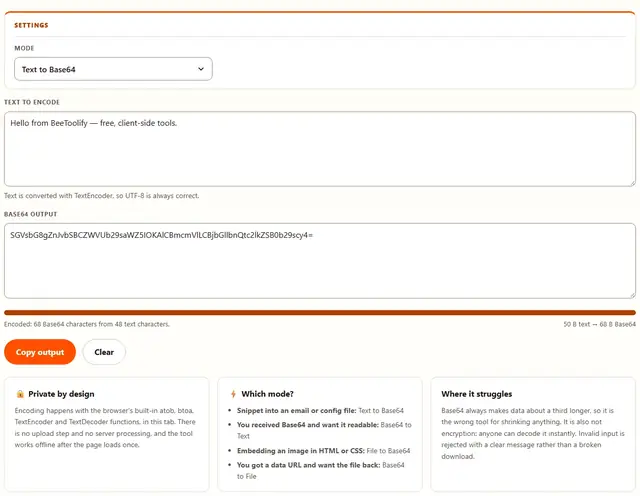
How to encode Base64
Three steps, no account, no upload.
Pick a mode
Text to Base64 and Base64 to Text handle words; File to Base64 and Base64 to File handle whole files. The inputs swap to match the moment you choose.
Add your content
Type or paste text, paste a Base64 string, or drop a file. The counters show the byte size before and after, so the 33% overhead is visible rather than implied.
Copy or download
Copy puts the output on your clipboard; Download file rebuilds the original bytes from Base64. Bad input stops at a clear error message instead of a corrupt file.
Why encode in the browser?
Because Base64 payloads are often secrets in transit: an API key pasted from a ticket, a signed token, a private note. Sending those to a converter site would defeat the point of encoding them. Here the work runs on your device, the clipboard stays yours, and nothing is logged. Details in our file-handling policy.
Troubleshooting
Why did my text get about a third longer?
Base64 represents every three bytes of input with four printable characters, so the output is always roughly 33% larger than the bytes it carries. That is the price of moving binary data through systems that only accept plain text. For a snippet it costs nothing; for a whole file it adds up.
Will accents, emoji and other special characters survive?
Yes. The tool encodes text as UTF-8 before Base64 and decodes it as UTF-8 afterwards, so accented letters, curly quotes and emoji all round-trip correctly. The byte counter shows UTF-8 bytes rather than character counts, because one emoji can be four bytes on its own.
Are my files or text uploaded?
No. Encoding uses the browser's own atob, btoa, TextEncoder and TextDecoder functions, entirely in this tab. Nothing is uploaded and nothing is stored. You can check: open DevTools, watch the Network tab while you encode something, and see that no requests leave.
How do I turn Base64 back into a file?
Switch the mode to Base64 to File, paste the Base64 (a full data URL works too, prefix included), and press Download file. The tool takes the file type from the data URL prefix when there is one, and otherwise hands back a binary file you can rename.
My Base64 gives an error. What is wrong?
Almost always a copy problem: a missing padding character, a stray line break inside a group, or smart quotes added by a word processor. The tool strips whitespace automatically and validates what is left, then says plainly that the input is not valid Base64 instead of producing a corrupt file.
What is a data URL, and when is it used?
A data URL is Base64 content with a type prefix, for example data:image/png;base64 followed by the payload. It lets an image, font or small file travel inside HTML, CSS or a config file with no extra network request. File to Base64 produces exactly this format, ready to paste.
Is Base64 encryption or compression?
Neither. Base64 only changes the representation: the same bytes arrive in a text-friendly alphabet, and they are trivially reversible, so treat it as a transport format, not a security tool. Anyone can decode it in one line of code. For secrets, use encryption; for shrinking files, use a compressor.
How do I convert an image to a base64 string?
Select the image file here and the tool encodes it as a base64 data URL you can paste straight into HTML or CSS. It reads the file with the browser's own encoder, so text and files both stay UTF-8 correct instead of breaking on accents. Nothing is uploaded.
What Base64 is: three bytes become four characters
Base64 takes any sequence of bytes and rewrites it using only characters that every system built for text accepts: 52 letters, 10 digits, +, / and = for padding. It works by reading three input bytes (24 bits) at a time and splitting those bits into four groups of six. Six bits give a number from 0 to 63, and that number points at one of the 64 symbols in the alphabet. Repeat, and binary data walks safely through channels that were never designed to carry it.
The output is guaranteed to be longer than the input, because no information is lost in the mapping: every three bytes must become four characters, and a partial group at the end is padded out to keep the shape uniform. Nothing is compressed, nothing is hidden, and decoding reverses the process exactly, down to the byte. It is representation only.
| Input | UTF-8 bytes | Base64 output | Base64 length |
|---|---|---|---|
| hello | 5 | aGVsbG8= | 8 |
| café | 5 | Y2Fmw6k= | 8 |
| BeeToolify | 11 | Y29tcHJlc3NiZWU= | 16 |
| Bee 🐝 | 8 | QmVlIPCfkJ0= | 12 |
Notice that "hello" and "café" have the same byte count despite different character counts: the é is two bytes in UTF-8. That is why the tool reports bytes, not characters, before and after. Characters count what you see; bytes are what Base64 actually encodes.
Why Base64 exists: getting binary through text-only pipes
The internet grew up on formats that assumed text. Email in the 1990s was plain ASCII, so a PDF attachment could not be dropped in as raw bytes: any character outside the printable range would be mangled by a relay in between. Multipurpose Internet Mail Extensions solved it with exactly this trick, and every attachment since has traveled base64-encoded inside the message body.
The same problem keeps reappearing, and Base64 keeps being the answer. A JSON config cannot hold raw bytes, so an encryption key goes in encoded. An SVG inline in HTML carries its raster fallback as a data URL. JWT tokens, CSS gradients referencing small files, QR payloads in some scanners: all text channels, all using the same alphabet. Where the channel is hostile to binary, Base64 is the adapter.
| Where you meet it | Form | Why it is used |
|---|---|---|
| Email attachments | Body part with a Base64 transfer encoding | Relays assumed ASCII text |
| Data URLs in HTML and CSS | data:<type>;base64,... | Embed a file with no extra request |
| APIs and config files | Encoded key or binary value in JSON | JSON stores text only |
| JWT and signed tokens | Header and payload encoded, dot-separated | Token must survive URL and header transport |
| Basic HTTP authorization | username:password encoded | Credentials travel in a header |
Text to Base64 and back: why UTF-8 decides everything
Base64 encodes bytes, not characters, so the step before encoding matters more than the encoding itself. Take any string of text, decide how to turn it into bytes, and the Base64 follows deterministically. The web's answer is UTF-8, which is what this tool uses on both sides through TextEncoder and TextDecoder. The same letters you typed come back after decoding, because both directions agree on the same byte mapping.
Tools that get this wrong usually treat text as a single byte per character (Latin-1 style), and the damage shows up immediately: accents become mojibake, emoji turn into garbage sequences, and a round trip silently corrupts anything outside ASCII. The failure is worst because it looks fine at a glance, a message that is 95% correct. Encoding and decoding in one tool with one rule removes that class of bug entirely.
File to Base64: how to convert an image to a base64 string
When the payload carries its own type, it becomes a data URL: data:image/png;base64, followed by the encoded bytes. The prefix tells whatever reads it what the bytes are meant to be, so an <img> tag, a CSS background-image or a config file can consume it directly, with no separate file, no upload and no extra request. The File to Base64 mode produces exactly that string, ready to paste.
The trade-off is size and cacheability. A small icon inlined as a data URL saves a request; a hero photograph inlined as one bloats the HTML and can never be cached separately. The usual working rule is that icons and tiny graphics benefit, anything a user might download or a page might reuse should stay a real file with its own URL. Base64 does not shrink data, it just changes where the bytes travel.
The reverse mode treats a data URL as input: paste the whole thing, prefix included, and the tool separates the type from the payload before decoding. Plain Base64 without a prefix works too, in which case the output is downloaded as a binary file with a generic type, ready for you to rename once you know what it is.
The 33% overhead, and when Base64 is worth paying it
The arithmetic is fixed: four characters in, three bytes out, so the encoded form is always about a third larger than the bytes it represents (exactly 4/3, plus padding on the last group). For text that is already tiny, the overhead is invisible. For a file, it is the difference between a 300 KB image and a 400 KB string in your HTML, which is why inlining photographs as Base64 is rarely a performance win.
Where the cost is clearly worth paying: anywhere the alternative is losing the data entirely. An attachment in a system with no binary support, a key that must live in a JSON value, an image that must be part of a single self-contained document. In those cases the alternative to Base64 is not "smaller", it is "impossible".
A note on the double error people chase: Base64 after compression still grows, because Base64 expansion always applies to whatever bytes it receives, compressed or not. If you need the opposite effect, shrinking is a job for lossless or lossy compression, handled by tools such as the Image Compressor or the ZIP Files tool. Encoding answers "how do I carry these bytes", not "how do I make them smaller".
Use cases: five jobs this encoder is built for
- Embedding a logo in a single HTML file. Convert the SVG or PNG to a data URL, paste it into the
src, and the page works from one file with no assets folder to lose. - Sending a token that a text field refuses. An API key with symbols the form rejects can travel as Base64, then be decoded on the far side without altering its bytes.
- Recovering a file from a data URL. A config or a saved draft contains
data:application/pdf;base64,.... Paste it into Base64 to File and the original document comes back with the right type. - Checking what an email attachment really contains. Paste the encoded block, switch to Base64 to Text, and readable content appears immediately; if it is binary, the tool says so rather than dumping noise.
- Encoding a snippet for a forum or ticket. Code blocks mangle indentation and quotes in some systems. Base64 survives every one of those journeys, and the recipient decodes it back to the exact characters.
What we actually tested
This page makes specific claims, so here is how they were checked. Every example in the tables above was produced by the same primitives the tool uses: TextEncoder for UTF-8 bytes and the standard Base64 alphabet, run against the exact strings shown. "hello" encodes to aGVsbG8=, "café" to Y2Fmw6k=, and both decode back to the original characters with byte counts matching what the counter reports.
Round trips: text with accents, curly quotes and emoji encoded and decoded back, byte for byte identical in both directions. Invalid inputs were fed in deliberately: a string with a character outside the alphabet, a group cut short by a stray break, an empty box. Each produced the clear error message instead of output, and whitespace was stripped as documented rather than rejected. The fatal UTF-8 path was exercised too, by decoding bytes that are valid Base64 but not valid UTF-8: the tool reports that the result is not text and points at Base64 to File mode instead of emitting mojibake.
In the browser, DevTools Network showed no requests during encode or decode, because the path is btoa/atob with chunking for large inputs, plus Blob for the download. Clipboard copies were confirmed with the async Clipboard API, with a selectable-text fallback for browsers that block it. What we did not do: publish benchmark timings from synthetic suites. The only numbers on this page are byte counts and lengths you can reproduce by pasting the same inputs.
Limits: what this encoder will not do, and why
An honest list beats a surprised user:
- It will not make anything smaller. Base64 adds about a third by design. Shrinking is a job for the Image Compressor or the ZIP Files tool, never for an encoder.
- It is not encryption. Decoding takes one line of code in any language. Treat output as transport, and use real encryption for secrets.
- Very large files are bounded by browser memory. Encoding processes in chunks, but the input, the output and the decoded copy can exist together at once, so a phone will reach its ceiling sooner than a laptop. The status line reports the failure when it happens.
- Invalid Base64 stops at the error. The tool refuses bad input rather than guessing at a repaired string, because a silently fixed payload is a corrupt file waiting to be trusted.
- No line wrapping or MIME headers. Some legacy systems want the output broken at 76 characters with headers around it. You get the raw payload; wrapping is a mail-client concern.
- Decoded text must be valid UTF-8. If the bytes are not text, the tool says so and points you at the file mode instead of printing broken characters.
Encoding a whole archive instead? Pack it with the ZIP Files tool, or see everything on the Tools page.
Also shrinking files?
The ZIP Files tool packs anything into one archive with a live before and after size: same privacy, same speed.
Open ZIP Files Tool