JPG to PDF Free: Turn JPEG Photos into a PDF
Turn JPG photos into a PDF without installing anything: drop your .jpg files, pick A4 or Letter (or pixel-exact pages), and download the finished document. No upload, no signup.
Convert your JPG photos to PDF
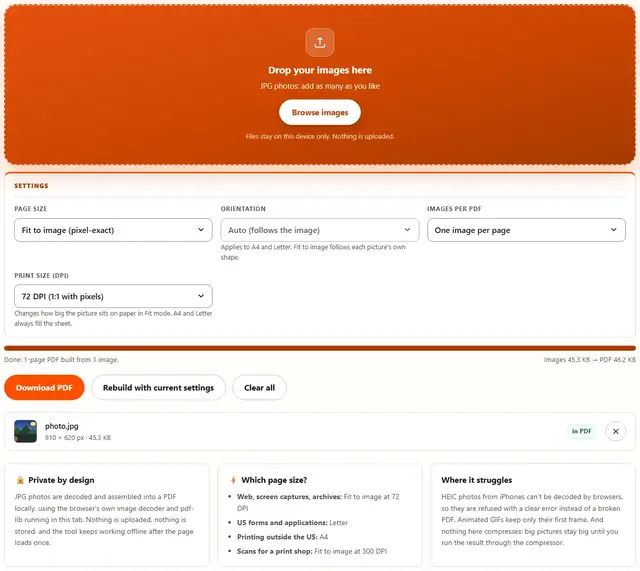
Drop your images here
JPG photos: add as many as you like
Files stay on this device only. Nothing is uploaded.
Applies to A4 and Letter. Fit to image follows each picture's own shape.
Changes how big the picture sits on paper in Fit mode. A4 and Letter always fill the sheet.
JPG To PDF — illustrated, step by step
How to convert JPG to PDF
Three steps, about ten seconds, no technical skills needed.
Add your JPG photos
Drag .jpg or .jpeg files onto the dropzone, or click to browse. Add them in the order you want the pages to appear.
Pick the page size
Fit to image keeps each photo's own pixels as the page. A4 or Letter gives a standard sheet, centered and scaled to fit.
Download the PDF
One click downloads the finished document, built entirely on your device. Before and after sizes appear under the progress bar.
What actually happens to your JPEGs
Three facts most converters gloss over. First, EXIF orientation is auto-applied: phones store rotation as a tag (orientation 6 = rotate 90°) and browsers decode "from image", so sideways phone photos land upright on the page. Second, JPEGs here are embedded byte-for-byte (embedJpg) — the exact bytes you dropped are copied in. Nothing is decoded, re-compressed or generation-loss'd; what was shot is what ships. Third, the white surround on A4/Letter absorbs the ~5 mm no-print zone every physical printer has.
That honesty cuts both ways: embedding never re-encodes, so the PDF is as big as the JPEGs inside it plus a few hundred bytes of page structure. Ten 6 MB phone photos make a 60 MB PDF — no compression, no apology. To hit a cap, compress the photos first, then build the PDF.
- EXIF orientation honored — upright pages from sideways phone bytes, no manual rotating
- Byte-copy embedding — zero generational quality loss, output tracks input sizes
- A4/Letter center the photo with white margins; Fit-to-image sizes the page to your pixels at the chosen DPI (72 default)
- Margins absorb the printer's ~5 mm dead zone; Fit-mode edge-to-edge can still clip on real hardware
- Order = drop order; big batches are fine — device memory is the limit, and hundreds of photos work
Purist caveat: PNGs pdf-lib can't embed directly get one re-encode through the canvas — not byte-pure. JPEGs always are.
Why convert in the browser?
Because there is no upload step, this is safe for confidential documents, medical scans, client work and personal photos: the files never leave the device you're sitting at. It also works offline once the page has loaded, and a whole folder of images becomes one PDF in a single pass. Details in our file-handling policy.
JPG to PDF: FAQ
Are my JPG photos uploaded?
No. The images are decoded and placed into a PDF by JavaScript running in this tab, using the browser's own image decoder and pdf-lib. Nothing is sent anywhere.
How do I make one PDF from several JPGs?
Drop all the photos at once: they land on separate pages in the order added. Choose Layout 'All images on one page' instead if you want a single contact-sheet style page.
Does the PDF resize my photos?
With Fit to image, each page matches the photo's pixels exactly (scaled by the DPI setting). A4 and Letter center each photo and scale it down to fit the sheet; nothing is ever upscaled.
The PDF is larger than my photos. Why?
JPEG bytes are stored as-is inside the PDF, plus page structure. A set of already-tight JPEGs usually comes out close to the original total; if you need it smaller, run the result through the PDF Compressor.
JPG to PDF: what the settings do
Each JPG becomes one PDF page by default, in the order you added them: perfect for scans, receipts and ID photos that a form asks to submit as a single document. Fit to image makes the page exactly the size of the picture, so nothing is cropped, scaled or letterboxed.
When a form or print shop specifies paper, switch Page size to A4 (210 x 297 mm) or Letter (8.5 x 11 in): the photo is centered on the sheet with white margins. Orientation follows the photo automatically, and the DPI control decides how large the image sits on the page when using Fit mode.
Combined a big stack of images?
The PDF Compressor shrinks the finished file next: same privacy, same browser-only pipeline.
Open PDF Compressor