Redact PDF: Black Out Text Free in Your Browser
Redact a PDF right here: drag a box over the content you want gone, then download. Marked pages are rebuilt as images with the box painted black, so the covered text is destroyed, not just hidden. No upload, no account, no watermark.
Redact your PDF
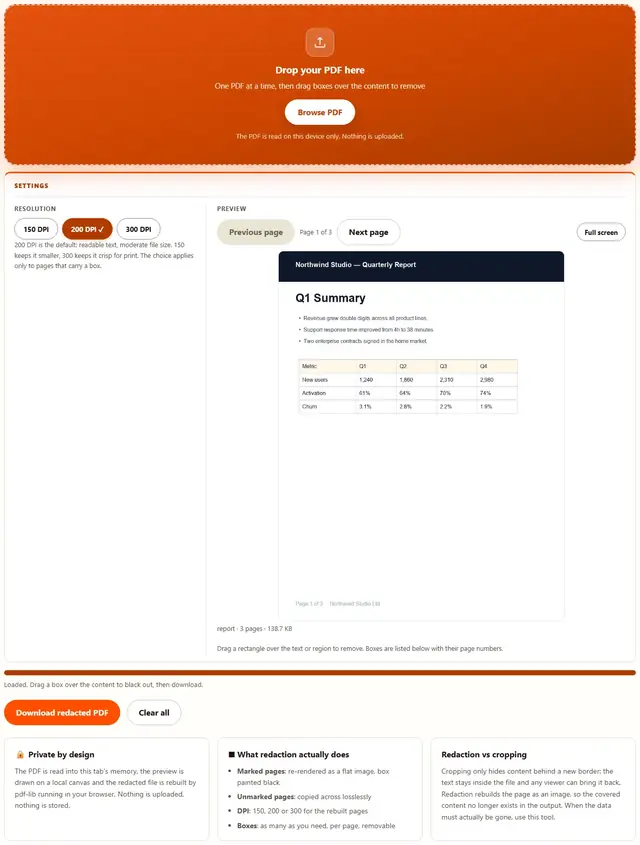
Drop your PDF here
One PDF at a time, then drag boxes over the content to remove
The PDF is read on this device only. Nothing is uploaded.
200 DPI is the default: readable text, moderate file size. 150 keeps it smaller, 300 keeps it crisp for print. The choice applies only to pages that carry a box.
Drag a rectangle over the text or region to remove. Boxes are listed below with their page numbers.
Redact PDF — illustrated, step by step
How to redact a PDF
Three steps. The PDF engine downloads only when you redact, so the page itself loads instantly.
Add your PDF
Drag a single PDF onto the dropzone or click to browse. The preview of page 1 appears as soon as the file loads.
Mark the content to remove
Drag a box over the text or region on the page you want gone. Mark as many boxes on as many pages as you need; each one is listed with its page number and can be removed again.
Redact & download
Choose 150, 200 or 300 DPI and press Download redacted PDF. Marked pages are rebuilt as images with the boxes painted black, so the covered content no longer exists in the file.
What people redact PDFs for
Court filings: party names, addresses and account numbers must be blacked out before a complaint or exhibit becomes public record.
Medical and HR records: dates of birth, diagnoses and employee identifiers come out before a document is shared across departments.
Public records responses: agencies release emails and reports daily; personal details of third parties are removed first.
Contracts sent for review: black out pricing, salaries or signatures so the reviewer sees only what they need to see.
Troubleshooting
Does this really remove the text, or just cover it?
It removes it. A page with a redaction box is re-rendered as a flat image at the chosen DPI and the box is painted black into that image. The original text operators are not carried into the output, so copy and paste, search and extraction all come back with nothing. Pages without boxes are copied across untouched.
Is redacting a PDF here free?
Yes, the whole tool is free: as many boxes as you need on as many pages, all three DPI choices, no signup and no watermark on the result. The status line shows the original and new file sizes after every download.
Is my PDF uploaded anywhere?
No. The file is read into this tab, the preview is drawn on a local canvas and the redacted file is rebuilt by pdf-lib running in your browser. Nothing is transmitted. You can verify it: open DevTools to the Network tab, redact a file, and watch nothing get sent. Privacy policy.
Why does the whole page become an image?
Because anything less is a cover-up, not a redaction. A black rectangle drawn over live text leaves the text in the file for anyone to select. Rebuilding the page as one image destroys the original content stream entirely. The cost is that text on that page is no longer selectable, and the file grows more than a pure vector edit would.
Which DPI should I choose?
200 is the default and suits most documents: readable text, moderate file size. Pick 150 for a quick share where size matters more than crispness, and 300 when the result will be printed or zoomed into constantly. DPI applies only to pages that carry a redaction box.
Can I redact more than one region on a page?
Yes. Drag as many boxes as you need on the same page or across pages. Each box appears in the list under the preview with its page number and size in points, and each can be removed on its own before you download.
Will the blacked-out content still be in the file?
Not on the marked pages: their original content streams are replaced by the image, so the covered text is gone from the file. On pages you did not mark, nothing changes at all, which is the point of leaving them untouched. Redact every page that carries sensitive content.
Learn more
PDFs are not the only place data hides: How to remove metadata from an iPhone photo covers the invisible layer in images, and every other browser guide lives on the blog.
How to redact a PDF so the text is really gone
Most PDF websites draw a black rectangle over your content and hand the file back with the text still inside, selectable by anyone who highlights it. Here the document is read into your browser tab, you drag boxes over the regions to remove, and on download every marked page is re-rendered as a flat image at the chosen DPI with the boxes painted black. The original content stream of that page is replaced, so the covered text no longer exists in the file. Nothing is transmitted, no account needed. Whether you searched for redact pdf or for how to black out text in a PDF, the steps are the same: add one file, drag the boxes, press Download redacted PDF.
The dashed amber outline on the preview is exactly what gets painted black. Drag it a little wider and the black band grows: the box you see is the content that disappears.
Redact a PDF free: no account, no watermark
Free here means the whole tool, not a trial: unlimited boxes on unlimited pages, all three DPI choices, the removal list, no signup, no watermark, no page cap. The status line tells you the exact result size after each run, and Clear all resets the document and the boxes. The PDF engine is fetched only the first time you redact, from this site's own folder, so the page opens instantly.
Redacted pages grow because they become images: a text page that was 20 KB can come back as a few hundred KB at 300 DPI. When the file gets heavy, send it to the PDF Compressor, and other free browser tools live on the tools hub.
Choosing the DPI for a redacted page
DPI decides how many pixels the rebuilt page carries. Higher means crisper text after zooming and printing, and a bigger file. The choice only affects pages with a box: everything else is copied and keeps its original size.
| DPI | Looks like | Use it when |
|---|---|---|
| 150 | Readable on screen, soft when printed | Quick sharing where size matters most |
| 200 | Clean on screen and decent in print | The default: most documents, most of the time |
| 300 | Print-shop crisp, zoom-friendly | Court exhibits, printed packets, long-term archives |
A rough rule: 150 halves the pixels of 300 in each direction, so a photo-heavy page comes out around a quarter of the size. Try 200 first and switch only if the result surprises you.
Redaction, cropping and black rectangles: the difference
Three ways to make content disappear on screen, only one of which removes it from the file:
| Method | On screen | In the file |
|---|---|---|
| Black rectangle over live text | Hidden behind a box | Still there: highlight or copy reveals it |
| Crop the page (Crop PDF) | Outside the new border | Still there: resetting the crop box reveals it |
| This tool | Black band on a flat image | Gone: the page's original content stream was replaced |
That middle row is why offices get burned: a rectangle drawn with a basic editor is decoration. If the file itself must not contain the data, the page has to be rebuilt, which is what happens to every marked page here.
Where a browser redactor earns its keep in the US
Six real jobs and the marking each one needs:
- Prepare a court exhibit. Black out the Social Security numbers and home addresses before the packet is e-filed or served.
- Release records under FOIA. Agencies redact third-party personal details daily; boxes go over names, emails and phone numbers.
- Share medical paperwork. Dates of birth, diagnoses and patient identifiers come out before a record moves between offices.
- Send a contract for review. Black out salaries, pricing or bank details so the reviewer sees only their section.
- Clean a police or incident report. Victims and witnesses are anonymized before publication, page by page.
- Scrub a scanned tax packet. Account numbers and employer identifiers are boxed out, then the file goes to the accountant.
When the whole document needs to go out smaller afterwards, the PDF Compressor squeezes the rebuilt pages, and the PDF Merger joins redacted pieces into one packet.
What we actually tested in the browser
Five checks we ran while building this page, and what came back:
The covered text is gone from the file
We built a two-page test PDF whose first page contains the line CONFIDENTIAL with a fake Social Security number, dragged a box over that line and downloaded. We then inflated every content stream in the output and searched: the string CONFIDENTIAL and the number were absent from the file entirely, while the unmarked second page still carried its own text.
Search and copy come back empty
Opening the redacted file in a PDF reader and searching for the redacted word returned no matches, and selecting across the black band produced no characters. The black area is image pixels, not text under a box.
Unmarked pages stay lossless
The second page of the test file was copied across: its text was still selectable and searchable in the output, and its page size matched the original exactly. Only the marked page had been rebuilt.
The box list reports what will be removed
We dragged three boxes on two pages: the list showed page numbers and point sizes for all three, removing one shrank the count, and the download contained exactly the two remaining regions blacked out.
What DevTools shows while you redact
Keep the Network tab open and run a redaction session: the only requests after page load are the PDF engine files, from this site's own folder. Your file's bytes never appear in a request body. There is no upload code path.
Honest limits: what this redactor won't do
- Marked pages become images. Text on a redacted page is no longer selectable or searchable, and the page carries its DPI in file size. That is the mechanism that makes the redaction real, not a side effect.
- It redacts what you mark. Content you do not box stays exactly as it was, including sensitive text on a page you forgot. Mark every page that carries secrets.
- It does not scrub metadata. Document properties such as title, author and creation date are copied as-is. Check File > Properties in your reader and clear them there when they matter.
- Encrypted PDFs must be unlocked first. An encrypted file can't be read without its password: open it in any PDF reader, use Print to PDF to make an unlocked copy, then redact that.
- Very long documents depend on device memory. The preview renders one page at a time, but the whole document sits in the tab while it works, so a heavy scan pile is a desktop job.
None of this is buried in fine print: the card beside the tool repeats the rebuild-not-cover caveat, and the troubleshooting answers cover the metadata and password cases.
Only hiding part of the page?
Crop PDF trims margins and borders without changing the content: same privacy, same speed, for the jobs where nothing sensitive is involved.
Open Crop PDF