Convert TXT to PDF Online Free
Turn plain-text files into a clean, searchable PDF without installing anything. No upload, no signup: drop a .txt file or paste your text, pick the page size and font, and download the result. Everything happens on your device.
Convert your text file to PDF
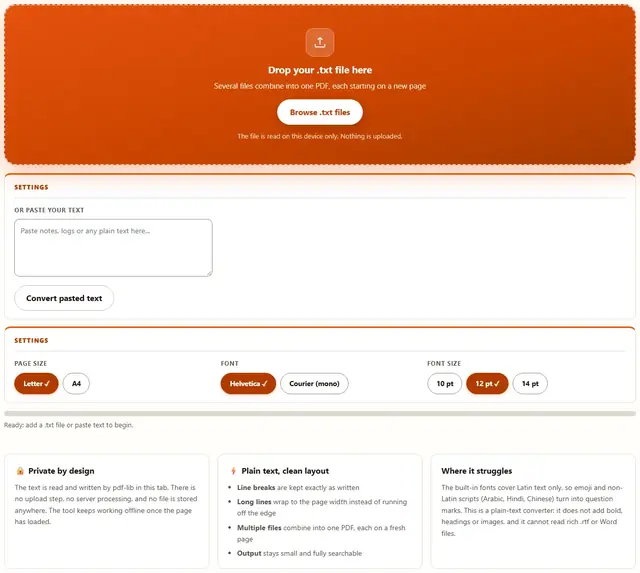
Drop your .txt file here
Several files combine into one PDF, each starting on a new page
The file is read on this device only. Nothing is uploaded.
TXT To PDF — illustrated, step by step
How to convert TXT to PDF
Three steps, about ten seconds, no technical skills needed.
Add your text
Drag a .txt file onto the dropzone, or click to browse. You can drop several files to combine them, or paste text straight into the box below the dropzone instead.
Choose the layout
Pick the page size (Letter or A4), the font (Helvetica for a normal look, Courier for a typewriter look), and the font size. Long lines are wrapped to the page width automatically.
Download the PDF
One click turns the text into a PDF and downloads it. The text is written as real text, so it stays selectable, searchable and small.
Why convert in the browser?
Because there is no upload step, this is safe for contracts, medical notes, code snippets, diary entries and anything under NDA: the text never leaves the device you are sitting at. It also works offline once the page has loaded, and a 200-page log file converts in one click. Details in our file-handling policy.
Troubleshooting
Are my text files uploaded?
No. The file is read by your browser and turned into a PDF by pdf-lib right here in the tab. There is no upload step and no server processing. You can verify it: open DevTools, go to the Network tab, convert a file, and watch nothing get sent.
Does converting TXT to PDF keep my line breaks?
Yes. Every line break in your text file becomes a line in the PDF, and blank lines stay blank. Long lines are wrapped to the page width instead of running off the edge, so nothing is cut off.
Can I convert several .txt files at once?
Yes. Drop more than one file and they are combined into a single PDF, with each file starting on a fresh page. You can also remove a file from the list before downloading.
Why do some characters show as question marks?
The built-in PDF fonts (Helvetica and Courier) only cover Latin text. Curly quotes and dashes are converted to straight ones automatically, but characters outside Latin-1, such as emoji or scripts like Arabic, Hindi or Chinese, cannot be drawn by these fonts and appear as a question mark.
Can I paste text instead of uploading a file?
Yes. Use the paste box under the dropzone, click Convert pasted text, and the pasted text is added as its own block in the PDF. This is handy for notes, logs or snippets you already have on the clipboard.
Is the PDF searchable and selectable?
Yes. The text is written into the PDF as real text, not as a picture of the page, so it stays selectable, searchable and copy-pasteable. It also stays small, because a text-only PDF stores characters, not pixels.
TXT to PDF: what actually happens to your text
A .txt file is just a stream of characters with line breaks and nothing else: no font, no page, no margins. A PDF is the opposite: every character is placed at an exact position on a fixed-size page, using an embedded font. Converting between the two means deciding all the things the text file never specified, which is why every converter asks about page size and font.
This tool makes those decisions explicit and keeps them honest. Your text is read, cleaned for the chosen font, and laid out line by line. Each line is measured with the real width of its glyphs, so a long line wraps at the last word that fits instead of running off the page. When the page fills up, a new one starts. The characters are written into the PDF as text, not rendered as an image, which is what keeps the file small and the text searchable.
| Setting | What it changes | Default |
|---|---|---|
| Page size | Letter (8.5 x 11 in) or A4 (210 x 297 mm) | Letter |
| Font | Helvetica looks like a document, Courier looks like a typewriter or code | Helvetica |
| Font size | 10, 12 or 14 point; larger size means fewer lines per page | 12 pt |
| Line wrapping | Long lines break at the last word that fits the page width | Always on |
Two honest details. Tabs become spaces, because the built-in fonts do not have a tab stop to honor. And curly quotes and dashes are converted to straight ones so they render correctly in the Latin fonts; everything the font cannot draw becomes a question mark rather than a broken file.
How a text file becomes paginated pages
The layout is the whole job: text in, pages out. Here is the path a single line takes.
Use cases: five places a plain-text PDF is exactly right
- Submitting a plain-text appendix. A court filing, permit application or school portal asks for an appendix as a PDF, and your notes are in a .txt file. Convert and upload: the text stays selectable, so it can still be searched and copied.
- Sharing logs and console output. A crash log or build output is a .txt file that people want to open on a phone. A PDF renders the same on every device and keeps the line breaks intact.
- Freezing a draft or diary entry. Turn a text draft into a dated PDF so nobody accidentally edits it, and so it prints the same way everywhere.
- Uploading a readme or license. Many forms accept only PDF. Convert the readme once and attach it, with no risk of the text reflowing on the reviewer's screen.
- Combining several notes into one document. Drop a handful of .txt files and they become a single PDF, each note starting on a fresh page, which beats emailing five separate attachments.
Need the result smaller, or the pages as images? Those live on the Tools page, including the PDF Compressor.
What we actually tested (and what the DevTools Network tab showed)
This page makes specific claims, so here is how they were checked. Open DevTools, go to the Network tab, convert a file: the only requests are the page's own HTML, CSS and JavaScript, plus the pdf-lib engine fetched on first use. Nothing uploads, because the text is read and written inside your tab.
On line breaks and wrapping: a file with short lines, blank lines and one very long line came out with the short lines intact, the blank lines preserved, and the long line wrapped at the last word that fits, with nothing clipped at the right margin. On size: a 40 KB text file produced a PDF well under 20 KB, because text-only PDFs store characters rather than pixels. On searchability: the converted text could be selected, copied and found with Ctrl+F in Adobe Reader, Chrome and macOS Preview.
Two honest details. Very large files (a few megabytes of text) take a few extra seconds, because every line is measured against the real font metrics before placement. And a line containing a single word longer than the whole page width is broken mid-word rather than overflowing, so the text never runs off the edge even in that corner case.
Limits: what this converter won't do, and why
An honest list beats a surprised user:
- It is plain text only. The tool reads .txt and pasted text. It does not open Word, RTF, Markdown or HTML files, because those formats carry their own styling and need a different parser. The Image to PDF tool covers images instead.
- Non-Latin scripts become question marks. Helvetica and Courier are the fonts built into every PDF reader, and they cover Latin text only. Converting Arabic, Hindi, Chinese or emoji needs an embedded Unicode font, which is a different, heavier tool.
- No bold, headings or colors. A .txt file has no concept of styling, so inventing it would change your content. If you need formatting, start in a word processor and print to PDF instead.
- Tabs become spaces. Plain-text fonts have no tab stops, so tabs are expanded to spaces to keep columns roughly aligned. Exact column alignment is the CSV to PDF tool's job, which lays out real tables.
- The PDF is not password-protected or signed. It is a normal, open PDF. Protection and signatures live in dedicated tools and readers.
Need to squeeze the result, turn it into images, or work with tables? Those live on the Tools page.
Working with a spreadsheet instead?
The CSV to PDF converter lays out comma-separated data as a real table, with the header repeated on every page.
Open CSV to PDF