PDF Metadata Remover: See & Strip Hidden Info
Drop a PDF and see exactly what it knows about you — Author, Title, Creator, Producer, creation dates, XMP fields — then strip them all in one click before you hit send. Nothing is uploaded, nothing is stored.
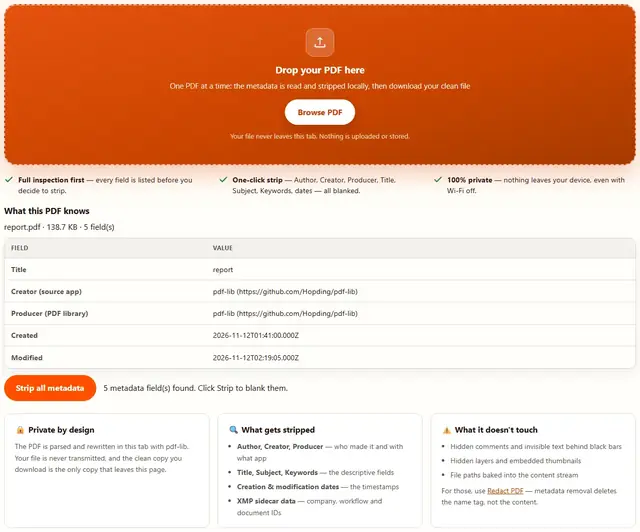
Drop your PDF here
One PDF at a time: the metadata is read and stripped locally, then download your clean file
Your file never leaves this tab. Nothing is uploaded or stored.
- Full inspection first — every field is listed before you decide to strip.
- One-click strip — Author, Creator, Producer, Title, Subject, Keywords, dates — all blanked.
- 100% private — nothing leaves your device, even with Wi-Fi off.
PDF Metadata Remover — illustrated, step by step
How to strip PDF metadata
Three steps, about ten seconds, no install.
Drop your PDF
Drag the file onto the zone. The tool reads the description fields locally — no upload, no waiting for a server.
Review what it knows
Every field — Author, Title, Creator, dates, XMP — is laid out in a table so you see exactly what you're about to delete.
Strip and download
One click blanks every field, then the cleaned PDF downloads. Open it again and confirm the table is empty — then send it with confidence.
Why you should check metadata first
The most common way people leak on an "anonymous" file is the file itself — not what's written in it, but what it knows. A CV that says "Senior Engineer" in the Author field. A contract drafted at 2 AM by the night-shift team. An NDA that literally timestamps itself. None of this is paranoia; all of it is in File → Properties right now.
Scanned PDFs have it too. XMP fields can carry the scanner model, serial number and even the network name of the machine it ran on. We've seen "confidential" invoices printed at a Fortune 500 with the scanner's asset tag in the properties panel.
What stripping does not do. It does not hide background layers, invisible text, hidden comments, or embedded thumbnails — those are content, not metadata. For that, use our Redact tool. Metadata stripping removes the name tag, not the body.
Where PDF metadata actually lives
Every PDF stores its description in two containers. First, the /Info dictionary: Title, Author, Subject, Keywords, Creator, Producer, plus Creation/Modification dates as UTC with a timezone offset. Second, the XMP packet, an XML stream beside it carrying company names, document and workflow IDs — and on scanner output, the device's model and asset tag. Every /Info field can be blank while XMP stays full.
Why Word files say what they say: Creator is the source application; Producer is the library that wrote the bytes. Print-to-PDF reads like Microsoft: Print To PDF; exports made elsewhere read differently. That string is a fingerprint, not a preference.
The honest loop is before/after: drop the file, read the table, strip, then re-drop the cleaned file and confirm the table comes back empty. Dates reset to the 1970 Unix epoch sentinel rather than vanish — some validators reject absent dates.
- /Info fields are blanked; dates become 1970-01-01, visible in any properties panel
- XMP is a separate container — re-check the cleaned file yourself before trusting it
- Hidden text, invisible layers and attachments are content, not metadata — Redact PDF handles those
- No server-side scan at the recipient can certify the before state — only your after check can
One limit we keep plain: stripping rewrites description fields only — pages, text and images are untouched, and we make no "verified clean" claim for packets we never parsed.
PDF metadata FAQ
What metadata does a PDF actually store?
Author, Title, Subject, Keywords, Creator (the app that made the source), Producer (the PDF library), Creation/Modified dates, and XMP sidecar data (company, workflow tags, document IDs, sometimes network paths).
Does removing metadata change the visible pages?
No. It removes only the descriptive fields. Pages, text, images and layout are untouched.
Does this strip hidden text?
No. Metadata is description-of-the-file. Hidden text behind black bars is content-of-the-file. Use Redact PDF for that.
Can print-to-PDF do this too?
For basic fields, yes — print-to-PDF generates a fresh file with blank metadata. It won't reliably remove XMP sidecar data in every viewer, and won't help if the source is encrypted. This tool handles the standard fields in one click.
Does it work on scanned/image PDFs?
Yes. Same fields exist on image-based PDFs — often blank already (the scanner doesn't know your name), but Creator/Producer and any XMP tags are still present and get stripped the same way.
Read the deep-dive
We wrote a full guide on exactly what your PDF knows and how to check it in any reader: Remove Metadata From a PDF (Author, Title, Dates).
Clean your PDF now
Drop it, review the fields, strip them, download. Free forever.
PDF Metadata Remover