Extract PDF Images Free Online, No Signup
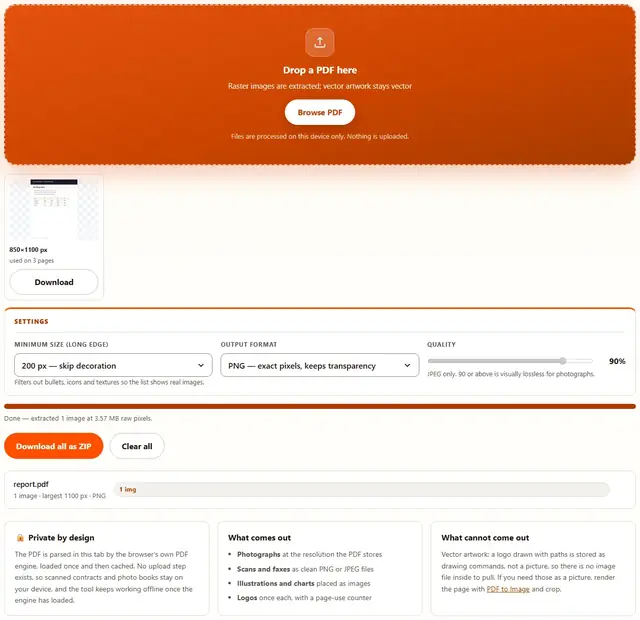
Drop a PDF and pull out every photograph, scan and illustration it embeds. Each image appears with its true resolution and how many pages use it, ready to download individually or as one ZIP. The parsing happens in this tab.
Extract images from your PDF
Drop a PDF here
Raster images are extracted; vector artwork stays vector
Files are processed on this device only. Nothing is uploaded.
Filters out bullets, icons and textures so the list shows real images.
JPEG only. 90 or above is visually lossless for photographs.
Extract PDF Images — illustrated, step by step
How to extract images from a PDF
Three steps, no accounts, no watermarks on the output.
Drop the PDF
Drop a file on the box, or click Browse. Every embedded raster image appears in the grid with its true resolution.
Filter and format
Raise the minimum size to skip icons and textures, and pick PNG for exact pixels or JPEG for smaller photo files.
Download
Grab images one by one or everything at once as a ZIP. Nothing is uploaded anywhere.
Why extract images in the browser?
Because the images inside a PDF are often the reason the file exists: scanned signatures, product photos, family albums. Extracting locally means the document never touches a server, there is no account and no queue, and the files are ready the moment the PDF loads. Details are in our file-handling policy.
Troubleshooting
Are my files uploaded when I extract images?
No. The PDF is parsed in this tab and each embedded image is decoded right here, then re-encoded to PNG or JPEG for download. There is no upload endpoint, so photographs, scans and illustrations inside a document never leave your device.
What kinds of images come out?
Every raster image the PDF embeds: photographs, scanned pages, illustrations and most logos that were placed as pictures. Vector artwork is not an image inside a PDF, it is drawing instructions, so it cannot be extracted as a file; use PDF to Image to render a whole page instead.
Why is one image repeated in the results?
Because the PDF reuses the same embedded image on several pages, for example a company logo in every page header. The tool lists each unique image once with a counter showing how many pages it appears on, so you download it once instead of ten times.
How does the minimum size filter help?
PDFs are full of tiny raster assets: bullets, icons, background textures. Raising the minimum size keeps the meaningful images and skips the decoration, so the result list stays readable. The default of 200 pixels on the long edge is a good balance.
PNG or JPEG for the extracted images?
PNG preserves the exact pixels including any transparency, which suits logos, screenshots and line art. JPEG weighs less at the same dimensions and is the better choice for photographs, where the quality slider at 90 or above is visually lossless.
Can I get the images at their original resolution?
Yes: extraction reads the image data the PDF actually stores, so what you get is the embedded resolution, not the page size it was displayed at. If the displayed size was scaled down, the extracted file is still full size, which is usually a pleasant surprise.
What lives inside a PDF
A PDF can hold images in two very different ways. Raster images are stored as compressed pixel data, exactly like a JPG or PNG file tucked inside the document; those are what this tool pulls out, at the resolution the file actually contains, which is often higher than the size they were displayed at. Vector artwork is stored as drawing instructions, like a tiny program that paints shapes, and there is no image file to extract because none exists.
The distinction explains most surprises. A photograph from a design magazine comes out at full quality and can be reused. A logo drawn by the designer comes out not at all, because it was never a picture. And a scanned contract comes out as one large image per page, which is usually exactly what someone wants when they need the scan without the PDF wrapper around it.
| Content in the PDF | Extracted? | Notes |
|---|---|---|
| Photographs | Yes, at full stored resolution | JPEG output keeps them small |
| Scanned pages | Yes, one image per page | PNG for exact pixels |
| Logos placed as pictures | Yes, once each | Page counter shows reuse |
| Vector logos and charts | No | Render the page and crop instead |
| Text | No | Use PDF to Text |
Extract images, render pages, pull text
Three tools read a PDF and give back different things. This one pulls the embedded pictures as files, at their own resolution. PDF to Image renders whole pages as flat pictures, which captures everything visible including vector art. PDF to Text takes the characters only.
Pick by what you need to reuse: the pictures themselves, the look of a page, or the words. Each shows its exact output before download, and all three run in the same tab without uploading the document.
Need whole pages instead of embedded pictures?
PDF to Image renders every page as a crisp PNG or JPEG: same privacy, same speed.
Open PDF to Image