Random Password Generator No Signup
Build a strong random password of 8 to 64 characters, watch the entropy readout as you adjust the sets, and copy it in one click. Everything is generated in this tab with real system randomness, and nothing you make here is stored or sent anywhere.
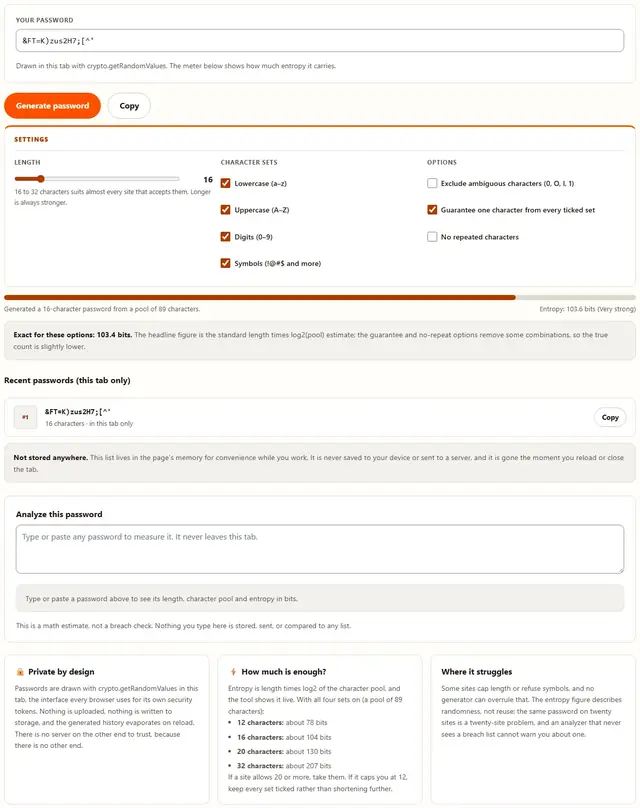
Generate a strong random password
Drawn in this tab with crypto.getRandomValues. The meter below shows how much entropy it carries.
16 to 32 characters suits almost every site that accepts them. Longer is always stronger.
Recent passwords (this tab only)
Analyze this password
This is a math estimate, not a breach check. Nothing you type here is stored, sent, or compared to any list.
Password Generator — illustrated, step by step
How to generate a password
Three steps, no signup, and the whole thing runs in this tab.
Set length & character sets
Move the slider between 8 and 64 and tick the sets you want. Sixteen characters with all four sets is a solid default; the meter shows the entropy before you commit.
Generate & copy
Press Generate for a fresh password drawn from the operating system's randomness. Copy it with one click, then store it in your password manager before you navigate away.
Analyze any password
Paste a password you already use into the analyzer to see its pool size, length and entropy in bits, computed with the same formula the generator shows you.
Why generate in the browser?
Because a password generator that phones home is a password generator you have to trust with the very secret it just made. Here the randomness arrives from your operating system, the assembly happens in JavaScript in this tab, and the result only ever exists on your screen and in the clipboard you copied it to. That also means it works offline after the first load, which is exactly when you want a password tool to be dependable. More detail in our privacy policy.
Troubleshooting
Are these passwords stored anywhere?
No. Each password is drawn in this browser tab with crypto.getRandomValues and is never sent or saved anywhere. The history list at the bottom of the tool is page memory only: reload the tab or close it and everything disappears, including the passwords you generated a minute ago.
Why does the tool avoid Math.random?
Math.random is a fast pseudo-random number generator whose state can be studied and predicted; it was never meant for secrets. crypto.getRandomValues asks the operating system for real randomness, and it is the same interface browsers use for TLS keys and session tokens.
How strong is a 16-character password?
With all four sets ticked the pool is 89 characters, so 16 characters work out to 16 times log2 of 89, which is about 104 bits of entropy. The tool computes and shows that figure live for whatever settings you pick, so you never have to trust a quoted number.
What does exclude ambiguous characters remove?
It strips the lookalikes 0, O, o, I, l and 1, which drops the full pool from 89 to 83 characters and lowers the entropy figure accordingly. It is worth using when someone will retype the password by hand from a printed card or read it over the phone.
What does no repeated characters change?
With that option on, no character appears twice: each position is drawn from what is left of the pool, like cards dealt from a deck. The entropy figure switches to the exact without-replacement count, which is slightly lower than the plain formula, and the length slider is capped at the pool size.
Does the analyzer check breach lists?
No, and it deliberately cannot. The analyzer reports the character pool, the length and the entropy in bits using the same formula as the generator, under the assumption that each character was chosen at random. It never sends the password anywhere, so there is no way to compare it against leaked-password databases, and we will not pretend otherwise.
A website rejected my 64-character password
Many sites cap password length, often at 16 or 20 characters, and some refuse symbols outright. Set the slider to the longest length that site allows, untick any set it bans, and use the entropy readout to check what is left. The same settings can still produce a strong password at a shorter length.
How strong is the password this generator creates?
Strength is shown as entropy in bits, which comes from the length and the character sets you enable. A 16-character password using upper case, lower case, digits and symbols gives roughly 90 to 100 bits, which is far beyond what guessing can break. The generator uses the browser's cryptographic random source, and nothing is saved or sent anywhere.
What a strong password generator with entropy actually measures
"Strong password" advice usually sounds like folklore: add a symbol, avoid dictionary words, rotate it every ninety days. Underneath all of it sits a single measurement that does not care about any of those rules. Entropy counts how many equally likely passwords your settings could have produced, and expresses that count as a power of two. The number in the exponent is the entropy in bits. Double the bits and you square the guess space; nothing else in password advice is that clean.
The formula is one line. Take the number of characters in your pool (how many symbols any one position could be) and the length of the password, then multiply the length by the base-two logarithm of the pool. That is the entire calculation, and it is the number this page shows you live in the meter. If your pool is 89 characters, log2 of 89 is about 6.48, so every extra character you add is worth about 6.5 more bits, and each extra bit means an attacker has twice the guessing to do.
| Length | All four sets (89-character pool) | Letters and digits only (62-character pool) |
|---|---|---|
| 8 characters | about 52 bits | about 48 bits |
| 12 characters | about 78 bits | about 71 bits |
| 16 characters | about 104 bits | about 95 bits |
| 20 characters | about 130 bits | about 119 bits |
| 24 characters | about 155 bits | about 143 bits |
| 32 characters | about 207 bits | about 190 bits |
Two honest footnotes come with that table. First, the numbers assume each character really was drawn independently at random, which is true of this generator and not true of anything a human invents. Second, the word "bits" is a scale, not a magic shield: what those bits defend against is an attacker guessing offline against one hash. A password reused across twenty sites loses to phishing no matter how many bits it carried, because the attacker never guesses at all.
Why length beats clever substitutions
The classic trick is character surgery on a familiar word: turn "password" into "p@ssw0rd!". It feels stronger, and it is slightly stronger, but the improvement is smaller than intuition suggests. Every substitution you make comes from a known, short list of swaps, and attackers know that list, because password rules have been teaching it to humans for decades. A rule that everyone follows is a rule the guessing software also follows.
Length works differently because there is no equivalent trick on the guessing side. Recall the arithmetic from the entropy section: each added character multiplies the guess space by the pool size. Going from 12 to 16 characters with all sets ticked is not four more characters, it is roughly a million times more combinations, and no amount of leetspeak compresses a 16-character random string back down to anything an attacker would enjoy.
So the ordering is simple. First, make the password long, using this generator so it is genuinely random. Second, keep every character set the site allows, because that raises the pool and each position inherits it. Third, worry about substitutions, mnemonics and "clever" patterns only if you are writing the password by hand, which is the one situation this tool is not built for. And if you do need a memorable phrase, build it from several truly random words rather than one word with symbols welded on.
How this generator actually picks characters
The randomness comes from crypto.getRandomValues, an interface every current browser exposes. It fills a typed array with bytes the operating system produced from its entropy pool, the same source that seeds TLS keys, session tokens and WPA handshakes. There is no server round trip and no seed you could observe, which is what separates this from a script that leans on Math.random(): that function is fast and fine for animations, but its output is a deterministic sequence, and deterministic is the last property a secret wants.
Between the raw bytes and the characters on screen sit two small pieces of care. The first is unbiased selection. Taking a random byte and computing its remainder when divided by the pool size is the natural move, and it is subtly wrong: if the pool size does not divide 256 exactly, the first few characters of the pool get picked marginally more often. This tool uses rejection sampling instead, discarding any draw that lands in the short tail and drawing again. It costs a few extra draws and leaves every character exactly equally likely.
The second piece is the options you can toggle. "Guarantee one character from every ticked set" places one required character per set first, fills the remaining positions from the full pool, and then shuffles the whole result with a Fisher–Yates shuffle powered by the same unbiased source, so the guaranteed characters are not sitting in predictable slots. "No repeated characters" works like dealing cards: each position is drawn from what remains, and the length slider caps itself at the pool size so the deal can always finish. When either option changes how many valid passwords exist, the meter notes the exact figure beside the standard one, because quoting a number that quietly ignores your settings would not be honest.
The three attacks your password is up against
The first is brute force: an attacker with a stolen hash tries candidates until something matches. This is the attack entropy defends against directly, because entropy is literally a count of the candidates. It is also the attack that is only ever fought offline, at the attacker's hardware speed, which is why the length of your password matters more than any rule about symbols. Two extra characters on a random password can outweigh every other decision on this page.
The second is the dictionary attack, and it works because human-chosen passwords are not random. Attackers do not start with aaaa; they start with words, names, seasons, sports teams, keyboard walks, and the handful of substitutions everyone makes to satisfy a password rule. A generator sidesteps this entirely by never producing anything pronounceable. If you insist on a memorable password, understand that you are accepting a much smaller effective pool than the character set suggests, because your choices are not spread evenly across it.
The third is the one math cannot help with: reuse and interception. A perfect 20-character password that also guards your email is a single phishing email away from unlocking everything downstream, and a password typed into a fake login page has been read, not guessed. The defenses here are structural rather than mathematical: a different password per site (which is only practical with a manager), multi-factor authentication wherever it exists, and never typing the password anywhere except the site it belongs to. Entropy wins the guessing game. Habits win the other two.
Where a generated password should live afterwards
A random password is only useful if you can produce it again on a different device, which rules out the two worst habits: keeping it in your head, and keeping it in a note on your phone. The workable answer is a password manager, whether that is the one built into your browser or a dedicated app. Generate the password here, paste it into the manager's entry for that site, and let the manager handle both storage and the login form afterwards. From that point on, the only password you have to remember is the one that unlocks the manager itself.
That master password deserves the same treatment as everything else: long, random, and never reused. It is the single secret the whole arrangement rests on, which is why length matters more there than anywhere, and why a passphrase-style string of several random words is a reasonable choice for that one credential. Do not reuse the password that guards your manager anywhere else, and do not store the master password in the manager's own cloud backup unprotected.
Two smaller habits round it out. Turn on multi-factor authentication for the manager and for your email, because email is the reset button for everything else. And treat the history list at the top of this page as a scratchpad rather than a vault: it exists so you can copy the password you just made without losing it, and it empties itself the moment you reload. If you close the tab before pasting, the password is simply gone, which is the correct behavior for a tool that promises never to store anything.
The analyzer: what it measures, and what it honestly cannot
The analyze panel exists for the password you already have, the one from an account you set up years ago and never touched again. Paste it in and the tool reports four things: the length, which character sets appear, the size of the character pool those sets contribute, and the resulting entropy in bits using exactly the formula the generator uses. Nothing is scored by vibes. If two passwords get the same number, they came from the same arithmetic.
| Character set | Characters | Contribution to the pool | Removed when "exclude ambiguous" is on |
|---|---|---|---|
| Lowercase | a–z | 26 | l and o (pool drops to 24) |
| Uppercase | A–Z | 26 | I and O (pool drops to 24) |
| Digits | 0–9 | 10 | 0 and 1 (pool drops to 8) |
| Symbols | ! @ # $ % ^ & * ( ) - _ = + [ ] { } < > ? / . , : ; ' | 27 | none: all 27 symbols stay |
| All sets together | lowercase + uppercase + digits + symbols | 89 | 83 |
What the analyzer cannot do matters just as much. It assumes every character was picked independently at random from the pool, which flatters human passwords: "Summer2024!" gets a number that overstates its real resistance, because it was never drawn from the pool at random and attackers know exactly that pattern. The number is a ceiling for a human password and an accurate measurement for a generated one. Characters outside the four standard sets, including letters from other alphabets, are counted individually and noted in the breakdown.
And the analyzer deliberately has no breach-list feature. Checking would mean sending your password somewhere, and a tool whose entire promise is that nothing leaves the tab cannot make that trade quietly. So we do the math, show the math, and say plainly that math is all we do. For the breach question, use a service that is designed for it and that can answer without ever revealing the password itself, such as the breach-notification features built into many password managers.
What we actually tested
This page makes specific claims, so here is how they were checked rather than asserted. The generator was run through its full range while watching three things. Guarantee mode was verified to leave at least one character from every ticked set in every generated password across repeated runs, including the corner cases: four sets at a length of eight, a single digit-only set, and the exclude-ambiguous option narrowing the pool. No-repeat mode was checked to never repeat a character, and to cap the slider at the pool size so the deal can always finish.
The entropy figures were cross-checked by hand. For the default settings the meter reports about 104 bits at length 16, which matches 16 times log2 of 89 computed independently; with exclude-ambiguous on, the pool figure it shows drops from 89 to 83 and the bits follow. The unbiased-selection path was reviewed against the standard rejection-sampling construction (draw from a range that divides 256 evenly, discard the tail), and the shuffle is a Fisher–Yates driven by the same source. We did not run a statistical test suite and claim a pass, because a browser tab is the wrong laboratory for that kind of claim.
The privacy claims got the simplest test of all. Open DevTools with the Network tab visible, generate a dozen passwords, paste text into the analyzer, and watch the request count stay at zero. Nothing is written to storage either, so a reload empties the history exactly as the note promises. The clipboard copy was exercised with clipboard permissions granted and denied, and the denied case falls back to the older selection-based copy instead of failing silently.
Limits: what this generator will not do, and why
An honest list beats a surprised user:
- The entropy figure is an estimate, not a prophecy. It is exactly correct for passwords this generator produces, and an upper bound for anything a human invents. It says nothing about reuse, phishing, or whether the site in front of you hashes passwords properly.
- Sites impose their own rules. Length caps, symbol bans and "must contain a letter" requirements are decided by the site, not by us. The tool adapts to them; it cannot overrule them.
- The history list is on your screen. Anyone looking over your shoulder can read it until you reload. That is the trade for not storing anything, and it is deliberate.
- The analyzer is not a breach check. It never sees a list of leaked passwords, because that would require your password to leave the tab. It measures structure and randomness, nothing more.
- No password manager, no sync, no vault. This is a generator, not a place to keep credentials. Copy what you make into your own manager straight away, because reloading loses it on purpose.
- Randomness comes from your browser. The tool uses crypto.getRandomValues, the same source your browser uses for its own keys. A device with a broken or seeded entropy source is a problem no web page can fix from here.
Need to fingerprint a file or verify a download checksum too? The Hash Generator runs with the same browser-only promise.
Also verifying a download?
The Hash Generator computes MD5, SHA-256 and SHA-512 for text or any file, right in your browser: same privacy, same speed.
Open Hash Generator