Compress JPG Online Free: Smaller JPEG Photos in Seconds
Compress JPG photos to 200KB, 100KB or 50KB right in your browser: no upload, no signup, no watermark. Drop your .jpg files, pick a quality, download smaller JPEGs in seconds.
Compress your JPG photos
Drop your images here
JPG photos: one file or hundreds
Files are compressed on this device only. Nothing is uploaded.
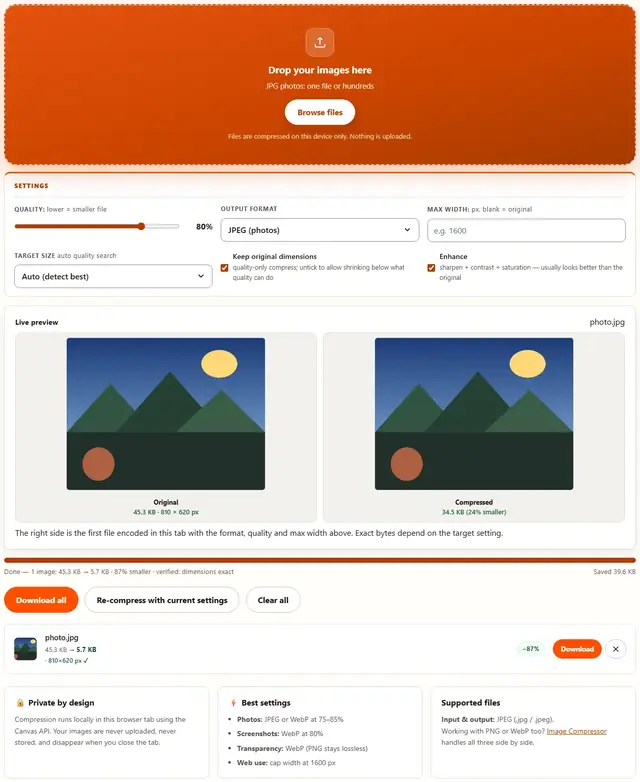
The right side is the first file encoded in this tab with the format, quality and max width above. Exact bytes depend on the target setting.
Compress JPG — illustrated, step by step
How to compress a JPG
Three steps, about ten seconds, no technical skills needed.
Add your JPG photos
Drag one or more .jpg or .jpeg files onto the dropzone, or click to browse. Hundreds of photos work as a batch.
Pick a quality
75-85% is the sweet spot for photos: usually 50-80% smaller with no visible difference. Set Max width to cap the pixel size if a form asks for it.
Download smaller JPEGs
Each row shows the exact before and after size. Download one file or grab them all at once.
JPG, actually explained
JPG (JPEG, same thing) has been the default photo format since 1992, and it survives for one reason: nothing else is universal. Every email client, government portal, WhatsApp upload and ancient laptop on Earth opens a JPG without asking questions. If you need one file format for photographs, this is it.
How it actually compresses. JPGs aren't stored as "pixels with a slider". The image is divided into 8×8 blocks, the data humans barely notice gets thrown away first, and the slider controls how brutally that happens. At 80% the losses are invisible to a casual eye. Below 50%, text smudges and skies turn to banding. Below 30%, it genuinely falls apart.
The one rule that matters: never re-save a JPEG as JPEG again and again. Every save throws more away, permanently. If you have the original, export once to the size you actually need. If you don't have the original — this page can still shrink it, but you can't uncompress a previous mistake.
Why ours is honest. The quality slider here shows you the real resulting size next to every file, and the exact-KB presets do the algebra for you. If 80% doesn't get you under 200 KB, no amount of wishful thinking will — we show you that instead of pretending.
Your images never leave this device
Everything happens inside your browser tab. There is no upload step, no server processing and no file logging: the tool works even after you go offline. That makes it safe for confidential documents, client work and personal photos. Details in our file-handling policy.
JPG compression: FAQ
Does this upload my JPG photos?
No. Compression happens locally in your browser with the Canvas API. Files are never uploaded, stored or visible to anyone else.
What quality should I pick for a JPG?
75-85% for photos keeps them visually identical while shrinking hard. Going below 60% starts showing blocky artifacts when you zoom in.
What's the difference between .jpg and .jpeg?
None: they are the same format with two file extensions. Windows added .jpeg because old systems only allowed three-letter extensions. This tool accepts both.
Can I compress hundreds of JPGs at once?
Yes. Drop any number of photos and they process as a batch; Download all saves every compressed file in one click.
Compress a JPG to 200 KB, 100 KB or 50 KB
Most online forms, job portals and email attachments cap image size, and a modern phone photo arrives at 3-6 MB. To hit a 200 KB, 100 KB or 50 KB target, start at 80% quality and read the after-size shown on each row. Still over the limit? Lower the quality in 5% steps and press Re-compress: every run starts from your original file, so repeated passes never pile up generation loss.
If the size limit is tight (under 50 KB), quality alone won't get a full-size photo there cleanly. Set Max width first (1200 px is a safe default for forms), then compress at 70-80%. Resizing removes far more bytes than extra quality cuts, and the result stays sharp at the size the form actually displays.
Learn more
Size limits, KB targets and form rejections: Compress a Photo to 20KB, 50KB or 100KB for Online Forms. Working the other way (bigger files, not smaller): Image Resizer.