Image to PNG Free: Convert JPEG & WebP to PNG
Convert images to lossless PNG right in your browser: sharp text, crisp edges, transparency preserved. No upload, no signup, no watermark.
Convert your images to PNG
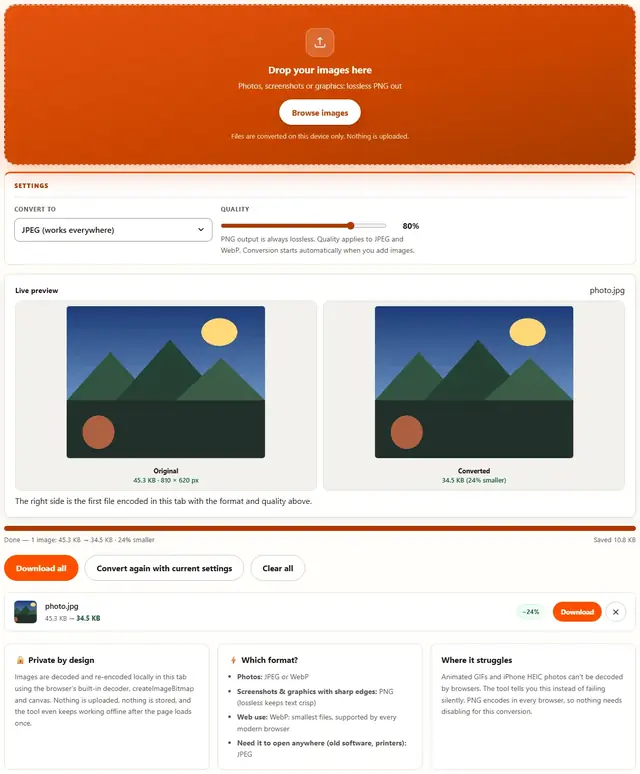
Drop your images here
Photos, screenshots or graphics: lossless PNG out
Files are converted on this device only. Nothing is uploaded.
PNG output is always lossless. Quality applies to JPEG and WebP. Conversion starts automatically when you add images.
The right side is the first file encoded in this tab with the format and quality above.
Image To PNG — illustrated, step by step
How to convert an image to PNG
Three steps, about ten seconds, no technical skills needed.
Add your images
Drag JPEG, WebP or other image files onto the dropzone, or click to browse. They convert one after another as a batch.
PNG is preselected
Output is locked to PNG: lossless, so no quality slider applies. Transparency from WebP sources is preserved.
Download the PNGs
Each row shows the before and after size. PNG is often larger than JPEG: that's the price of lossless pixels, and the file opens everywhere.
The format that keeps every pixel honest
PNG exists because some images can't afford to be guessed. Screenshots of text, line art, diagrams, logos, UI mockups — anywhere a half-looked-at pixel is a wrong pixel — PNG stores every single one exactly. No 8×8 blocks, no quality slider, no compromise.
When to deliberately convert to PNG:
- Screenshots of text. JPEG smears the edges of letters. PNG keeps them razor sharp at any zoom. This is non-negotiable for documentation.
- Logos and icons that must sit on any background — PNG's transparency survives every email client and CMS in ways JPEG/BMP never will.
- Pixel art and diagrams where a wrong pixel is a wrong answer, not a small blur.
- Scans of signatures where the bank needs to see the exact ink path.
The price of admission: PNG files are bigger — often a lot bigger. A photograph saved as PNG can be 5–10× the JPEG equivalent. If the image is a photo and you just wanted it "better quality", you don't want PNG; you want JPEG or WebP.
One honest tip: for flat graphics, this page reduces the palette intelligently, which is why icons and logos shrink dramatically while photos don't budge much — and we'll tell you which situation you're in rather than fake the result.
Why convert in the browser?
Because there is no upload step, conversion here is safe for confidential documents, client work and personal photos. The files never leave the device you're sitting at. It also works offline once the page has loaded, and a whole folder of images can be converted and downloaded in one go. Details in our file-handling policy.
Image to PNG: FAQ
Why is my PNG bigger than the JPEG I started with?
PNG is lossless: it keeps every pixel exactly, which costs bytes. Converting a lossy JPEG to PNG cannot add detail back, it only makes the file larger. Convert the other direction (Image to JPG) when size matters.
When is PNG the right output?
Screenshots, logos, line art, text-heavy images and anything with transparency: lossless storage keeps edges and glyphs perfectly crisp where JPEG would smear them.
Does PNG keep transparency?
Yes: PNG supports alpha channels natively, and conversion from WebP or other transparent sources preserves them. JPEG sources have no transparency to keep.
Are my files uploaded?
No. Decoding and encoding run entirely in this browser tab with the Canvas API. Nothing is sent anywhere, and the tool works offline once loaded.
Lossless conversion: what PNG keeps
PNG stores the exact pixel values the decoder produced, so converting to PNG never degrades the image: what you see is what gets written. For screenshots and UI captures that means text stays razor-sharp and hard edges stay hard, with no ringing or smearing around letters.
The trade-off is size, especially for photographic content: a JPEG photo converted to PNG can triple in bytes with zero visible improvement, because PNG cannot recover detail the JPEG already discarded. Use PNG when crispness matters, and Image to JPG when the file has to stay small.
Also shrinking images?
The Image Compressor handles JPEG, PNG and WebP with a live quality slider: same privacy, same speed.
Open Image Compressor